From your first site
to your next regular.
We configure your brand, menu and loyalty rules, then test the experience with your team. Start with an agreed first site and expand once it works for your operation.
From your brief to a working experience.
Our team turns your brief into working guest and operator journeys on the product. Your people validate the experience before launch.
Through a marketplace
Delivery · via a third-party app
- Loaded Birria Street Tacos£11.29
- Chili Cheese Fries£8.59
- Paid to the platform£19.88
Commission on every orderGuest data stays with them
Directly from you
Table 12 · via the QR code at the table
- Loaded Birria Street Tacos£11.29
- Chili Cheese Fries£8.59
- Paid£19.88
Order 4821Same account on web and app
Same order. Only one of them starts a relationship.
- Discover
Start with the service.
Map the brands, sites, guest journeys and the jobs your team needs to do. Identify what stays and what needs to connect.
- Design
Make your brand feel at home.
Configure menus, navigation, rewards and operator workflows around your brief. Our delivery team reviews the work with you.
- Try and refine
Put it in your team’s hands.
Walk through real scenarios: ordering, payment, redemption, approvals and the things that can go wrong.
- Launch and operate
Keep improving after opening day.
Release the validated first scope. Agree support ownership, then use the same build-and-review loop as your operation evolves.
Start with one site. Know what comes next.
Your pilot has an agreed scope, a named owner and a clear checklist. Adding locations follows evidence from the first site.
| Stage | What you can expect | What we confirm together |
|---|---|---|
| Explore today | Try the demo restaurant’s menu, ordering and rewards on your phone, and explore its real back-office screens. | Payments are simulated. The back office captures contain seeded demo data; Alex’s journey and the employee scenarios are worked examples. We confirm the modules and connector scope for your pilot. |
| Scope your pilot | Choose the first site, the guest journey and the loyalty rules. Map the menu, brand and team roles. | Delivery schedule, payment setup, messaging, guest consent and the modules included. |
| Connect and validate | Test the agreed ordering, payment and loyalty journeys with your team before live use. | POS vendor access and supported capabilities, automatic versus staff-assisted steps, refunds and failed handoffs. |
| Measure and expand | Review identified orders, return visits, redemptions and operational issues at the pilot site. | Available data, success measures, support ownership and readiness for the next location. |
A POS connection is a defined scope.
Retter has integrated with all major POS providers in Turkey and the GCC. Previous restaurant projects include integrations with Oracle MICROS / Simphony and NCR / Aloha. Start without a POS link. Connect when you are ready. How deep the link goes depends on what your POS vendor opens up. We confirm it in writing before you commit. Day one works with no POS link at all. Book a demo
Follow a worked guest journeySee how orders and rewards connect across two sites.
From the first order to a reason to return.
Three purchases, two locations and one approved campaign. Follow Alex to see where the evidence comes from and how an action reaches a guest.
Illustrative scenario with fictional records and actual demo screens. The invitation and return steps show the intended campaign workflow; sending and campaign measurement are not yet available. Today you can build audiences, preview offers and export a customer list.
An order becomes the start of a guest record.
Day 1 · 12:18
Alex signs in and orders lunch for collection. The items, the payment and the points earned stay together. Marketing permission is a separate choice, not a condition of buying lunch.
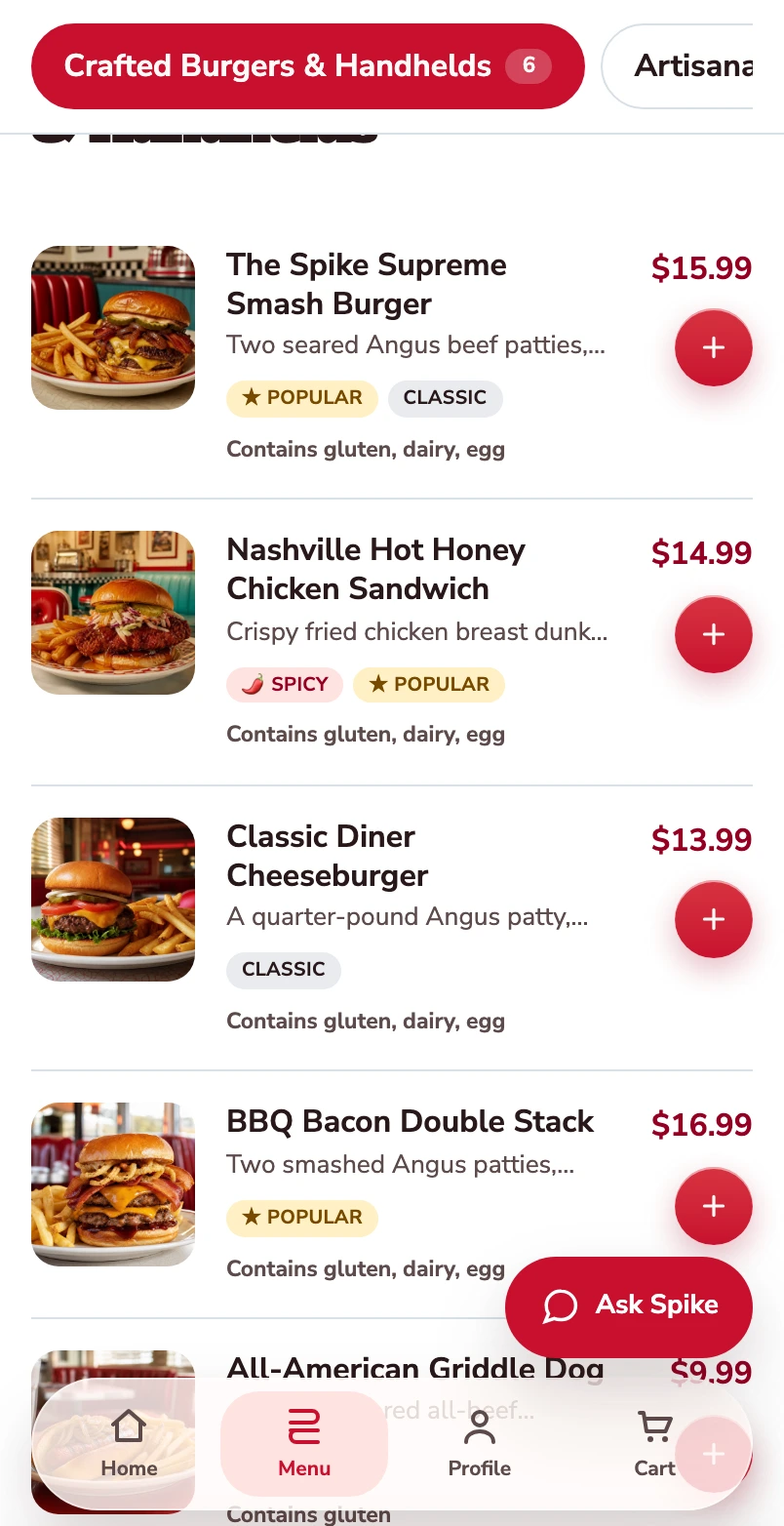
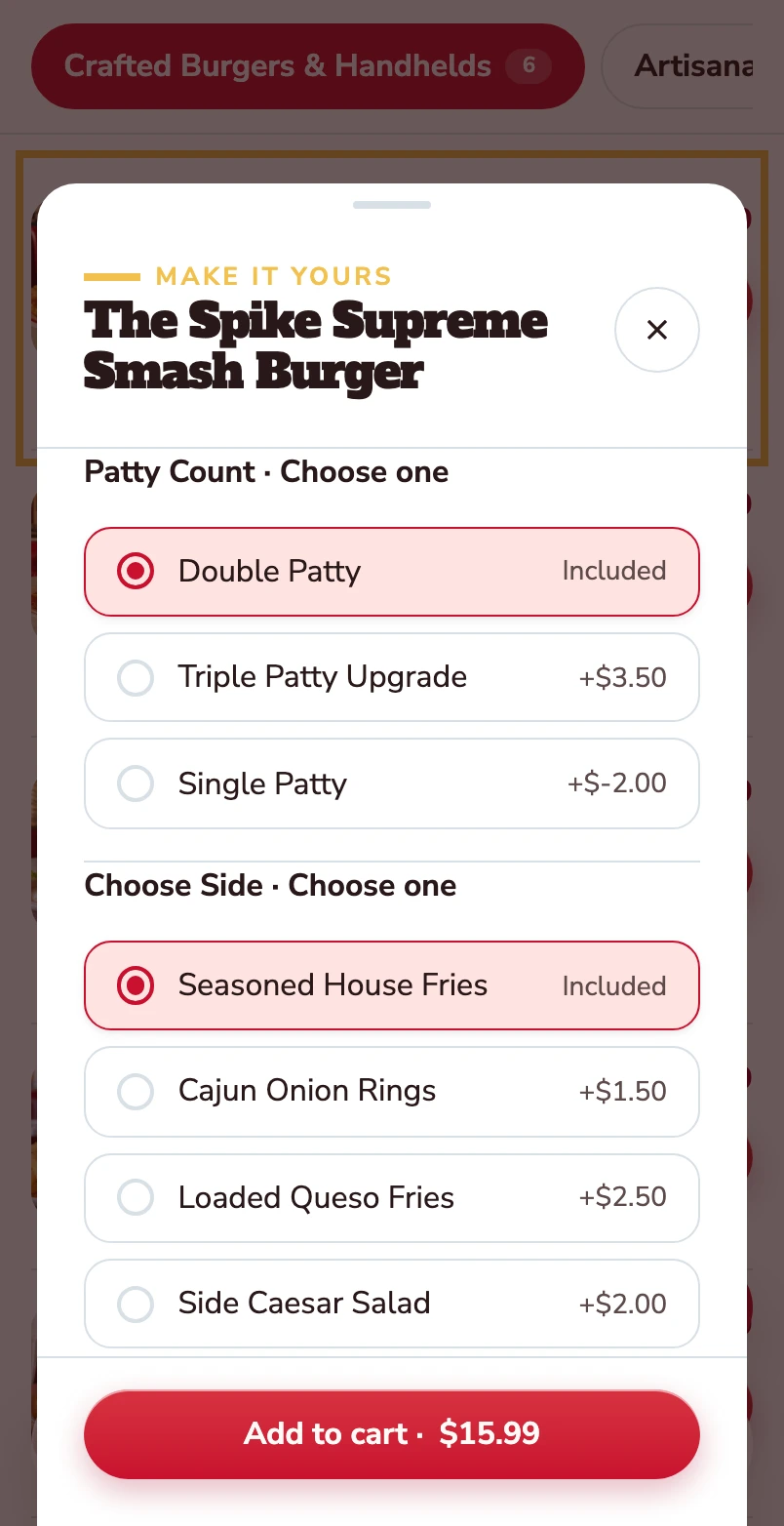
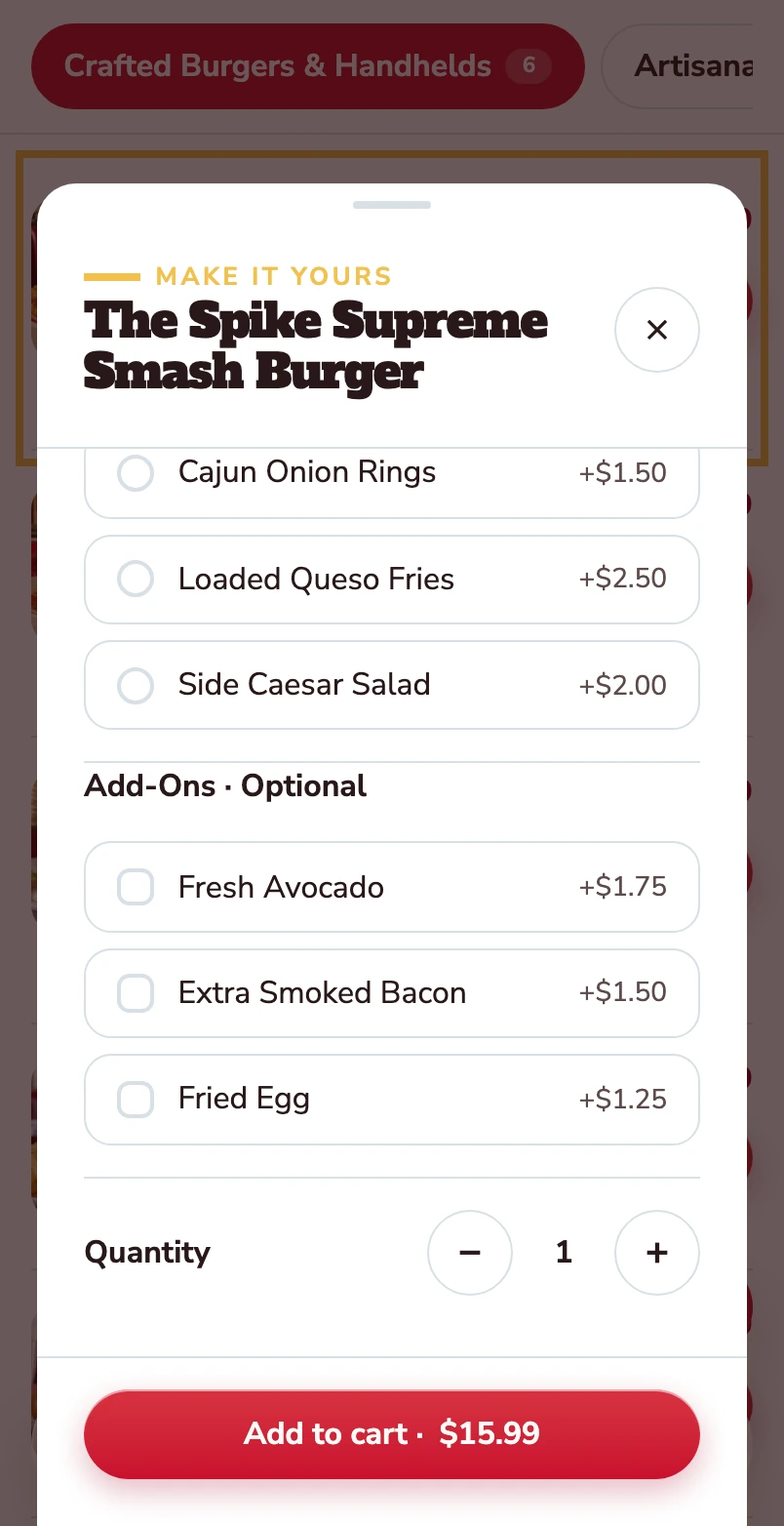
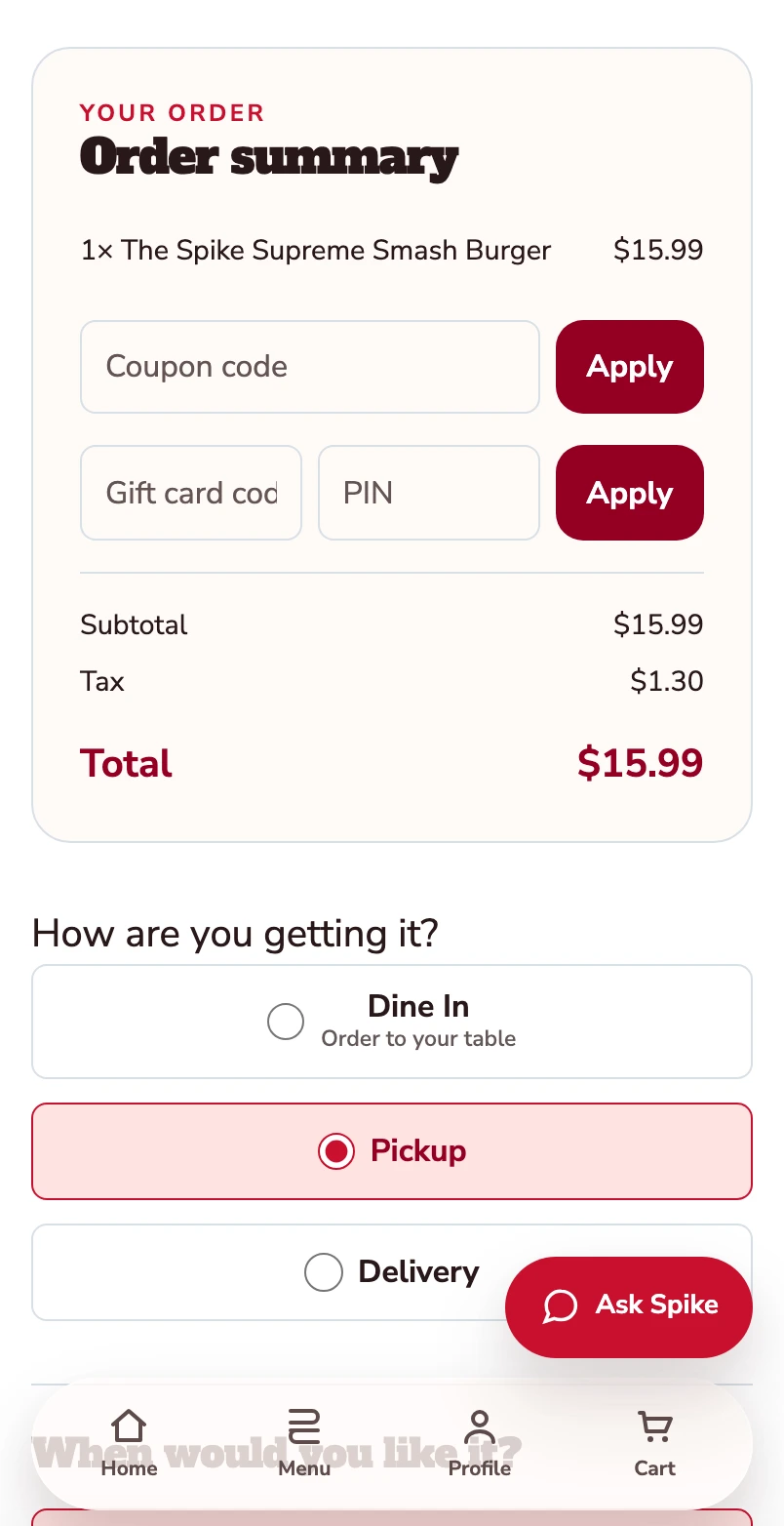
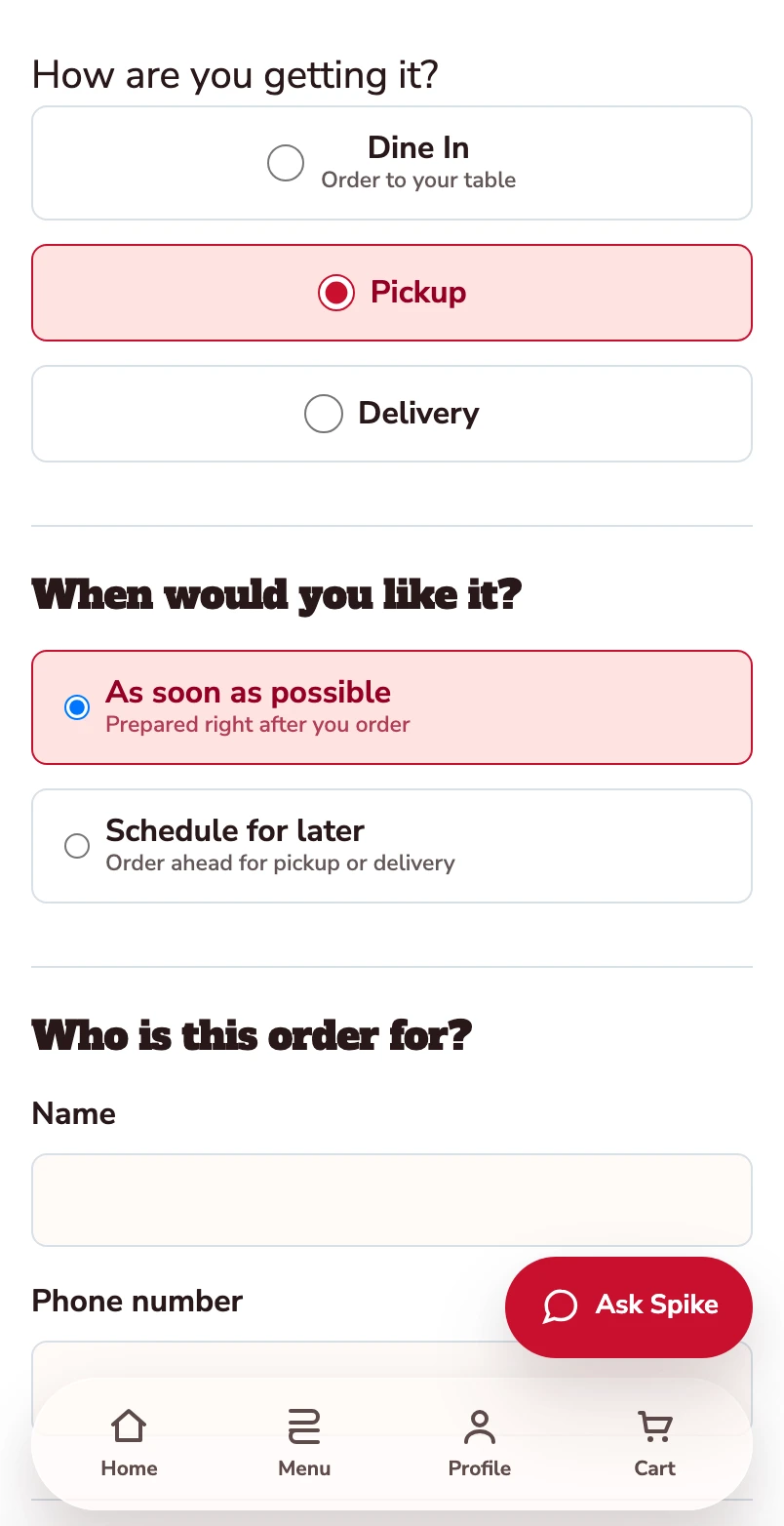
Start with the burger menu.
One burger follows through this mobile web journey, from its choices to its populated checkout.
Open the burger.
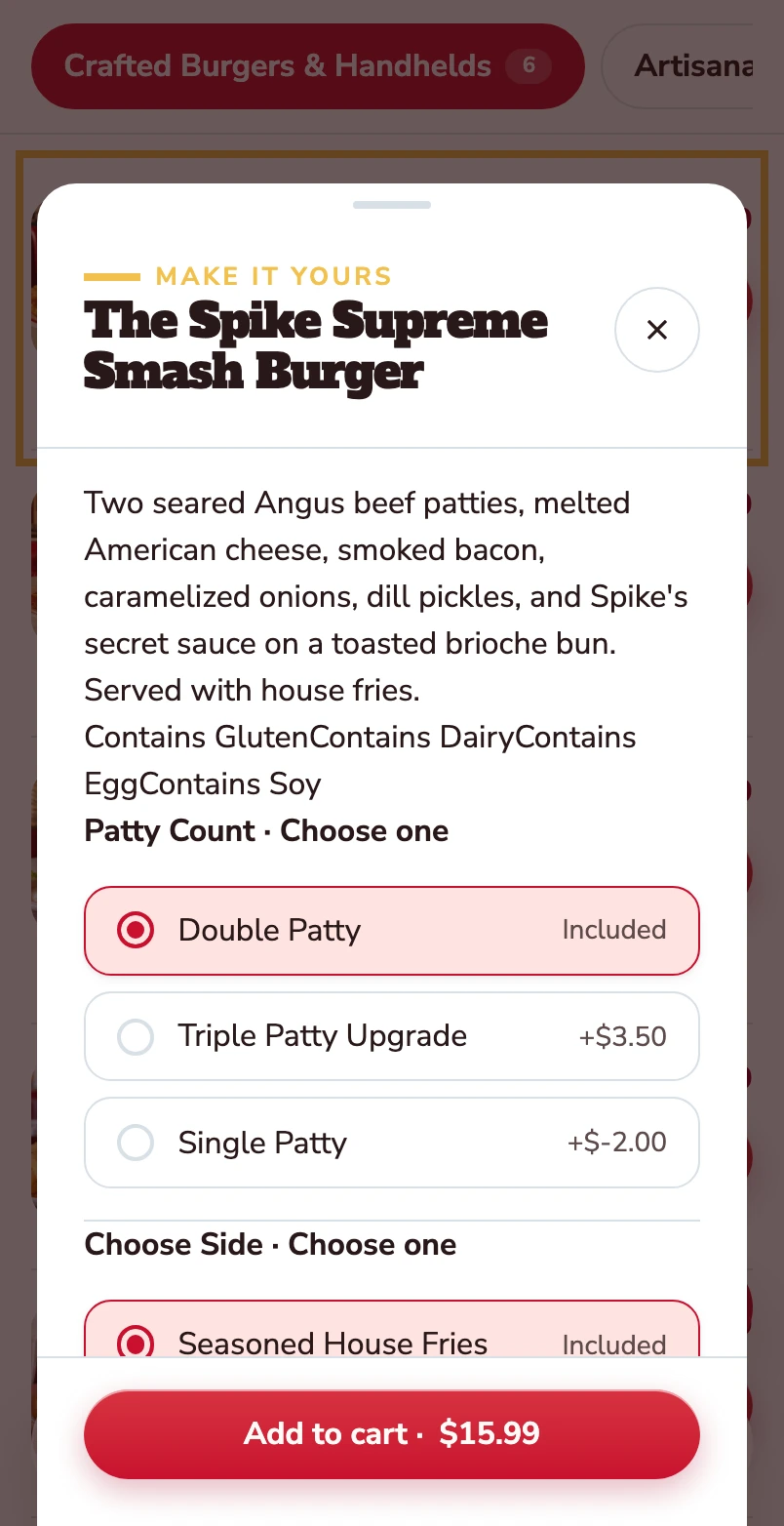
The item opens with its description, allergens and the choices attached to it.
Choose the patty and the side.
Double patty and house fries are included. Other choices show their price difference before the item goes into the basket.
Make it yours.
Avocado, extra bacon and a fried egg are optional. Quantity and the Add to cart total stay together at the bottom.
Added to your basket.
Your burger is now in the basket. The order summary shows one item and a $15.99 total before checkout. Pickup is selected.
Confirm how you’re ordering.
Pickup is selected. Review the timing and contact details before payment.
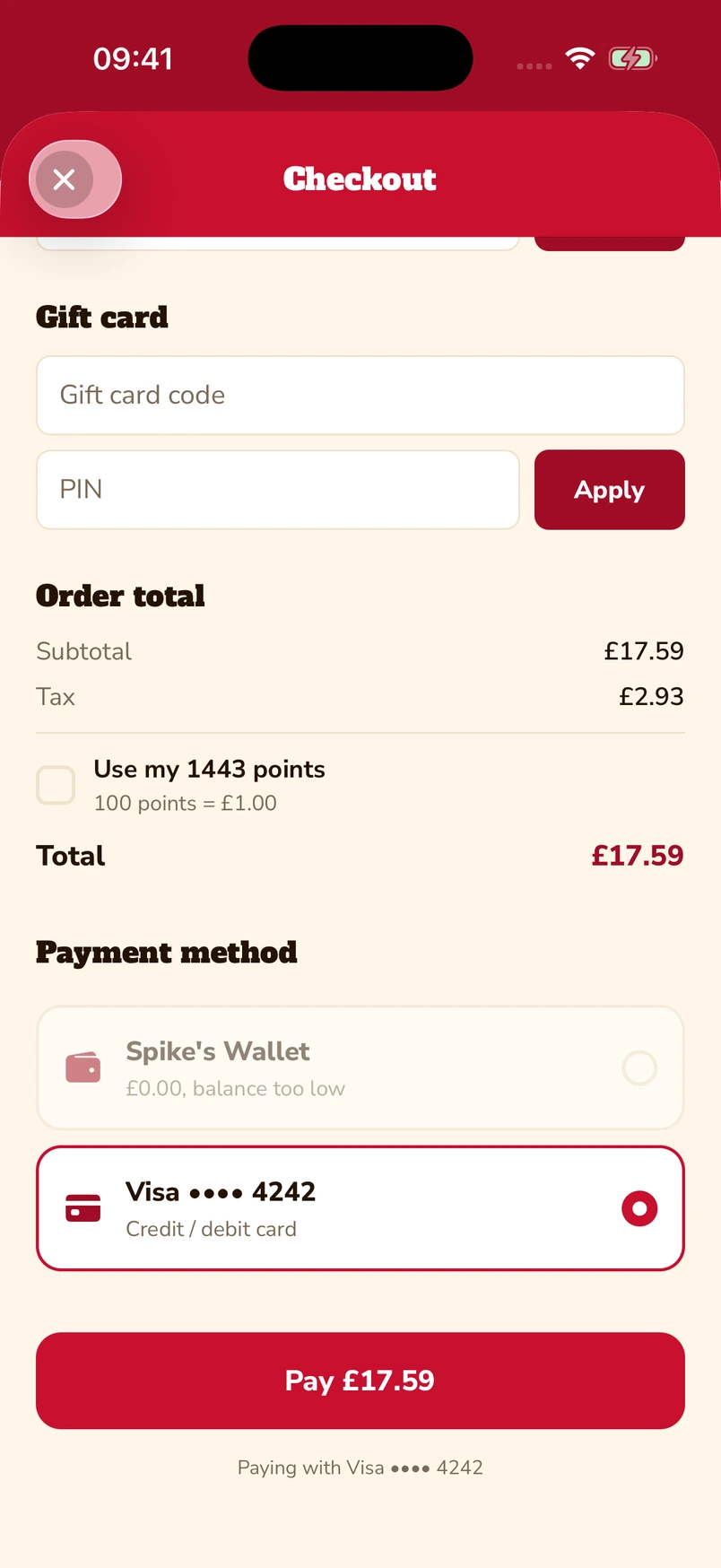
Put gift cards and points towards the bill.
Enter a gift-card code and PIN, or choose to use loyalty points at checkout. The captured app screen shows 1,443 available points alongside a saved Visa card.
Native iOS app · Spike’s Diner demo
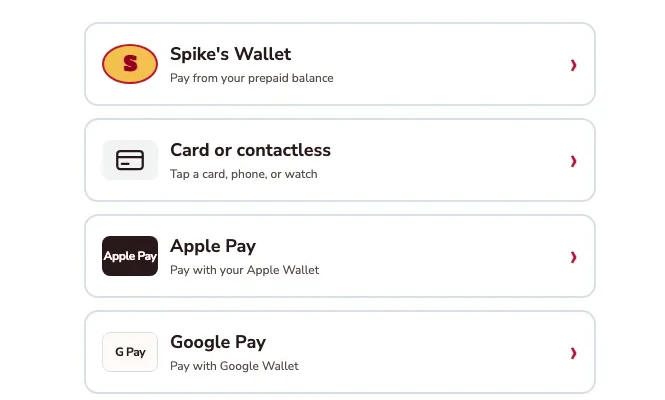
Apple Pay, Google Pay or a card.
The kiosk demo puts Apple Pay and Google Pay alongside card or contactless payment and prepaid wallet. Choose the method that suits you.
Kiosk demo · Payment-options detail · Simulated payment
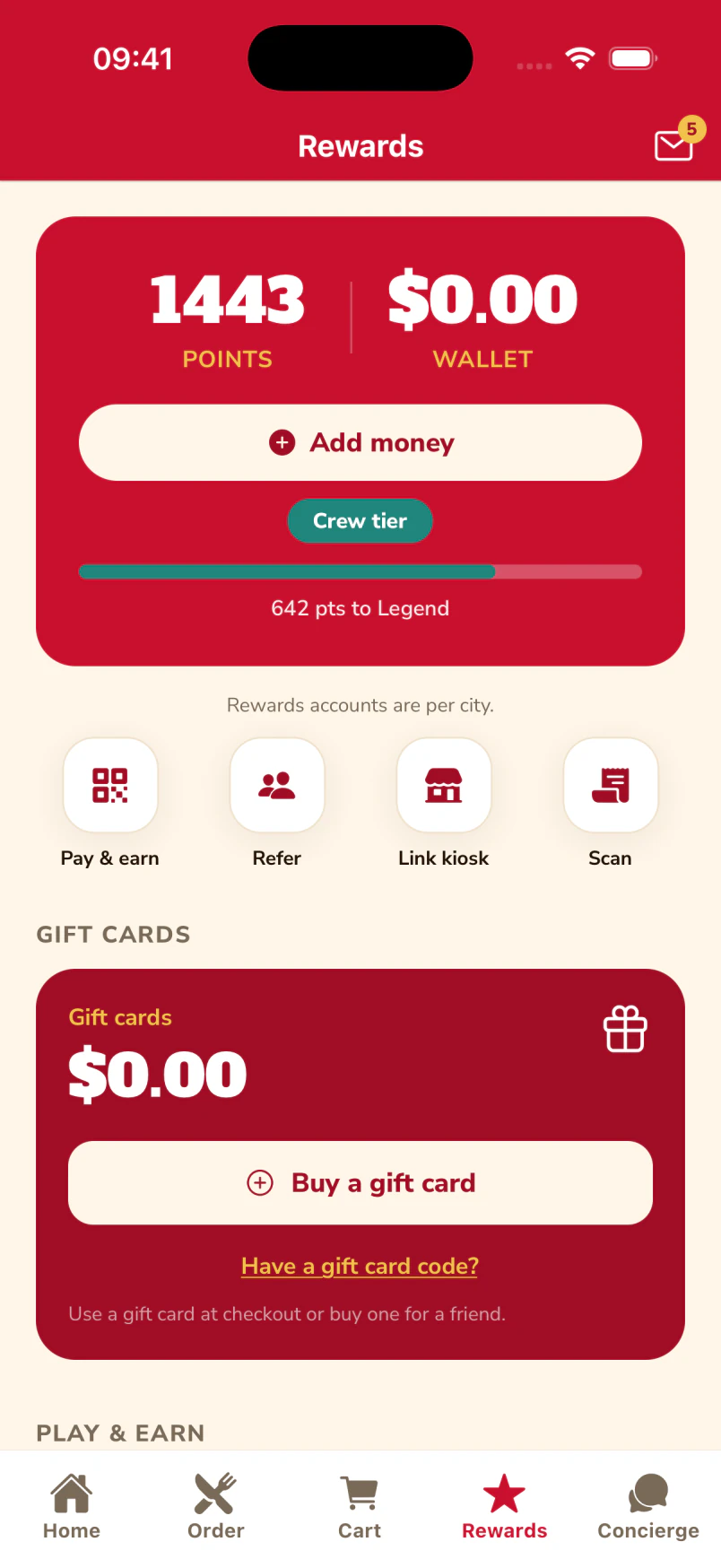
Keep a balance ready for the next visit.
The guest’s account brings prepaid balance, loyalty points and gift-card balance together. This example shows £29.01 in the wallet, 1,443 points and an Add money control.
Native iOS app · Spike’s Diner demo
What your team sees Example operator record
- Recorded purchases
- 1 purchase · £14.50 paid
- Loyalty balance
- 145 points
- Contact choices
- Email opted in · SMS off
- Latest activity
- Day 1 · 12:18
The receipt becomes useful context
- Identity
- Signed-in guest AM-104; no matching by name alone
- Order
- SD-1042 · collection · Riverside
- Purchase history
- Vegetable bowl and lemonade: recorded choices, not inferred dietary needs
- Contact permission
- Email opted in · SMS off
Connected history (1 event)
- First direct order · £14.50Day 1 · Riverside · +145 pointsNew
How the first visit connects
The account identifies Alex. The confirmed purchase adds an order and a points entry to that account. In this example 10 points are earned per £1 paid; the programme and the currency are yours to configure.
A coffee and pastry add to the same relationship.
Day 4 · 09:06
Alex buys a coffee and pastry at the group’s café using the same guest account. The group connects the visit while each brand keeps its own menu, prices and service.
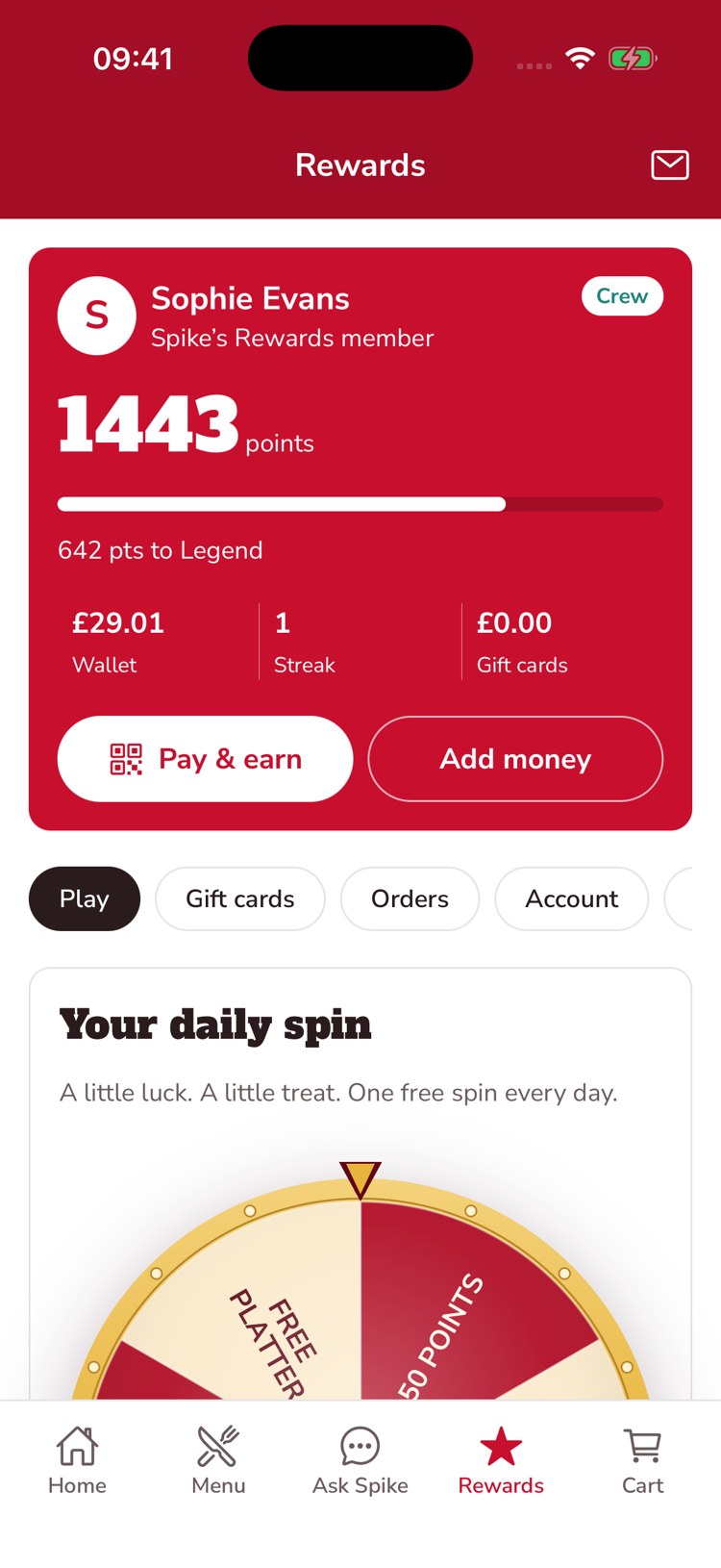
A reason to come back.
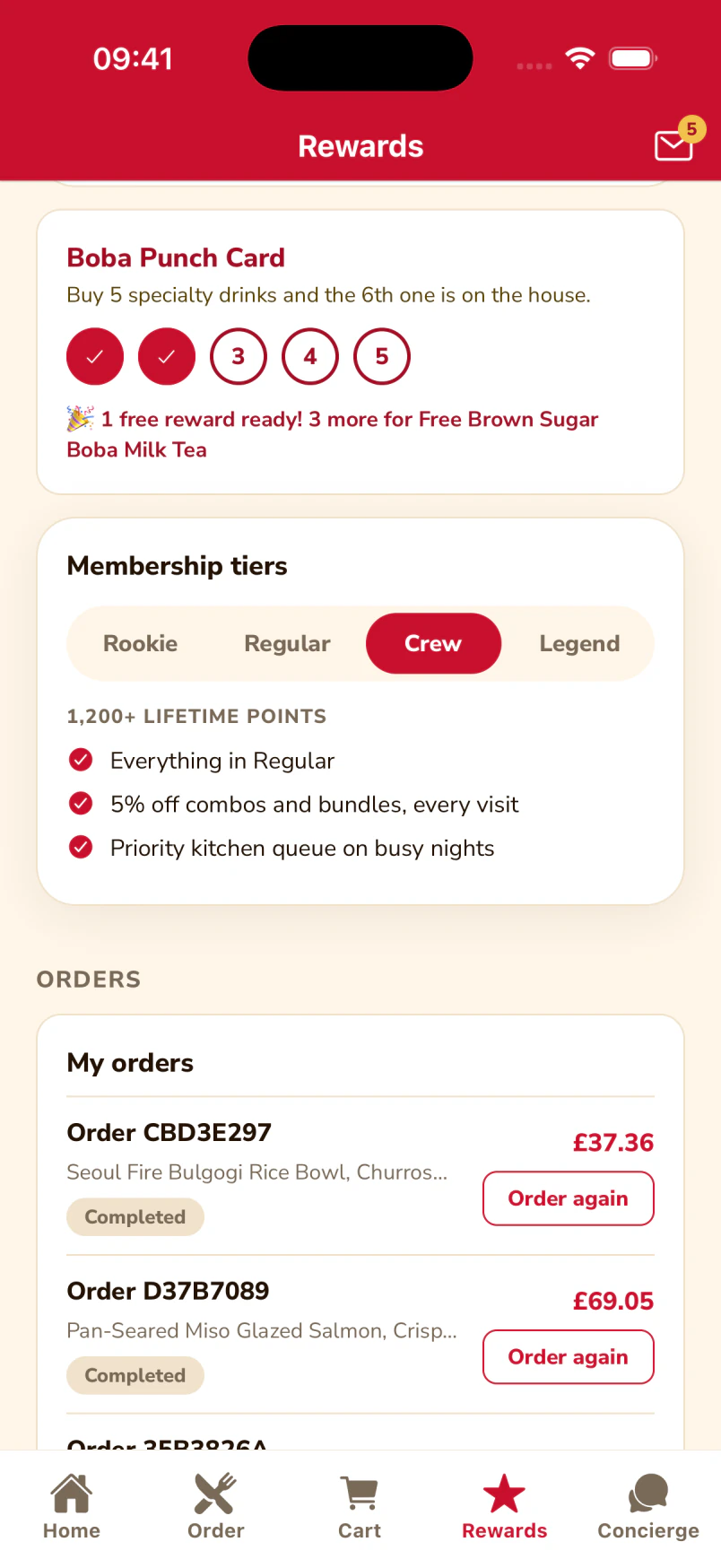
The guest’s rewards wallet keeps their available points, membership tier and progress together.
A reason for the next visit.
The Boba Punch Card with its stamps and the Crew membership benefits, inside the same app the guest orders from.
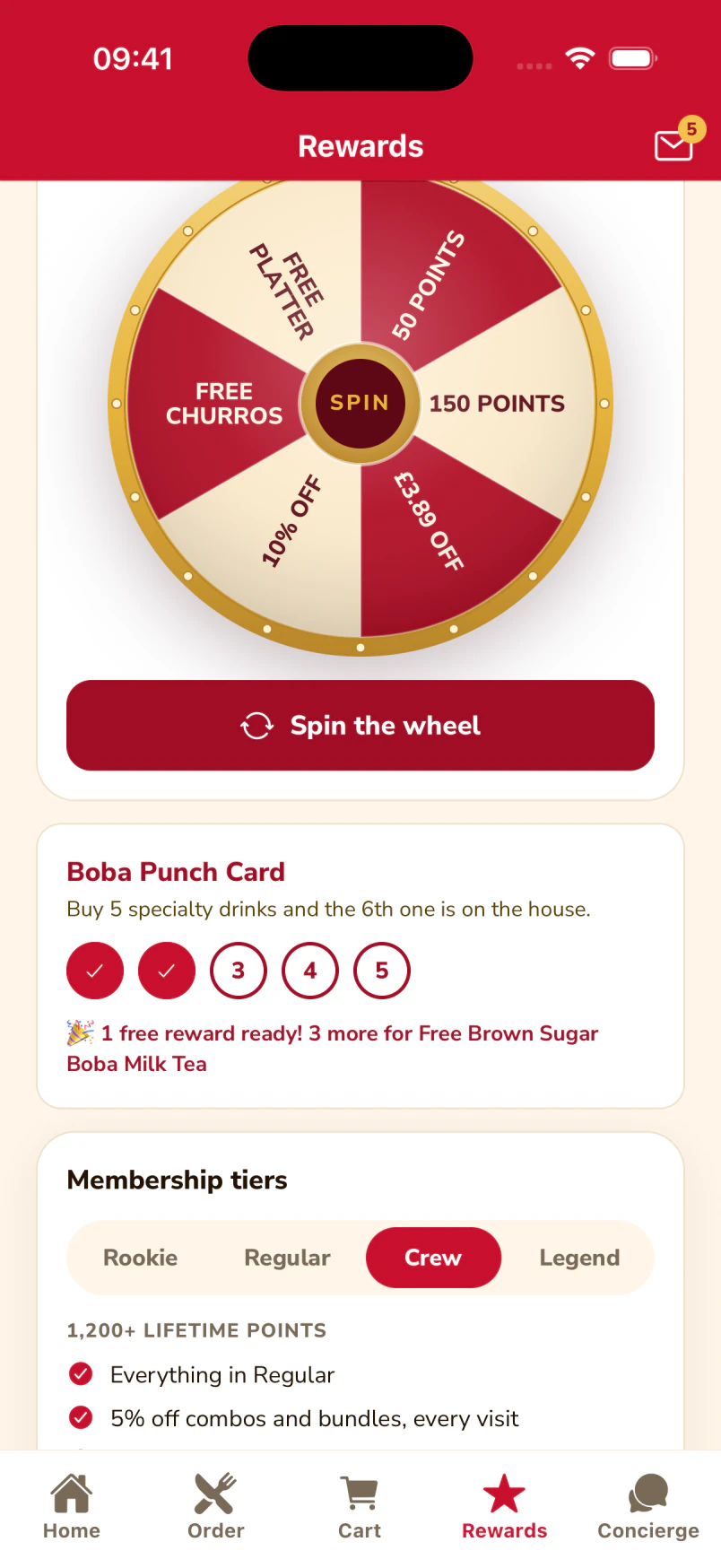
More reasons to return.
The app brings the daily rewards wheel and the guest’s punch-card progress together.
What your team sees Example operator record
- Recorded purchases
- 2 purchases · £21.00 paid
- Loyalty balance
- 210 points
- Contact choices
- Email opted in · SMS off
- Latest activity
- Day 4 · 09:06
Shared identity, local control
- Identity
- Same guest account AM-104 presented at the café
- History
- Lunch at Riverside, breakfast at Station Road
- Loyalty ledger
- 145 existing + 65 earned = 210 points
- Brand control
- Café menu and prices stay local; group reward rules apply
Connected history (2 events)
- First direct order · £14.50Day 1 · Riverside · +145 points
- Second location visited · £6.50Day 4 · Station Road · +65 pointsNew
What joins the records?
An identified account links these purchases. Anonymous orders do not become Alex’s history. Without a POS sales feed, staff add points by scanning the guest’s code; item-level history needs connected order data.
The team can explain why Alex gets this offer.
Day 25 · 10:00
Alex has not bought anything across the group for 21 days. Marketing prepares a return-to-lunch invitation, checks eligibility and permission, and a named person approves it before it is sent.
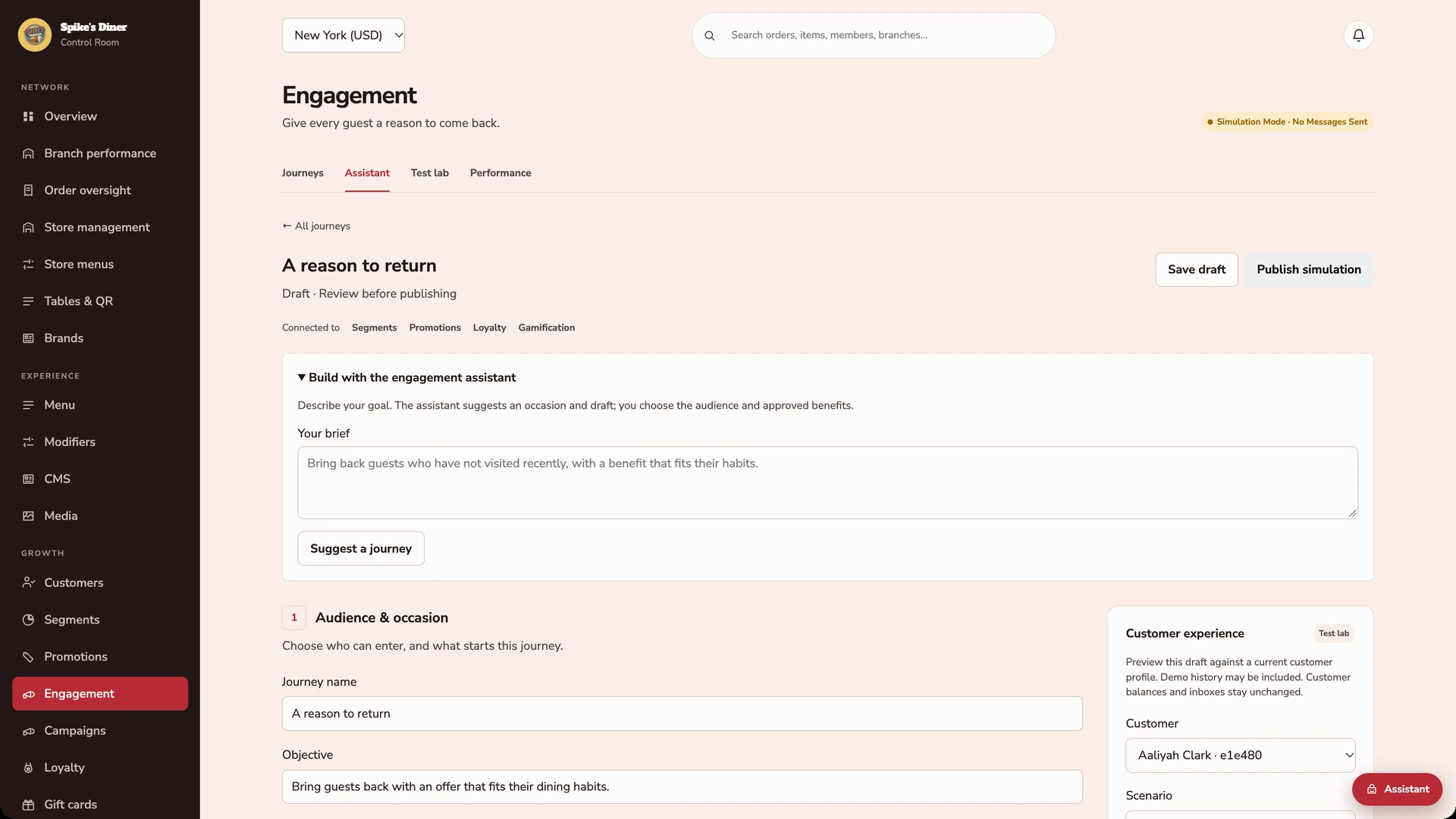
Set the purpose of the journey.
Describe the occasion to get a suggested journey template, then choose the audience and approved benefits. This screen sets up the campaign; individual decisions happen in the customer preview.
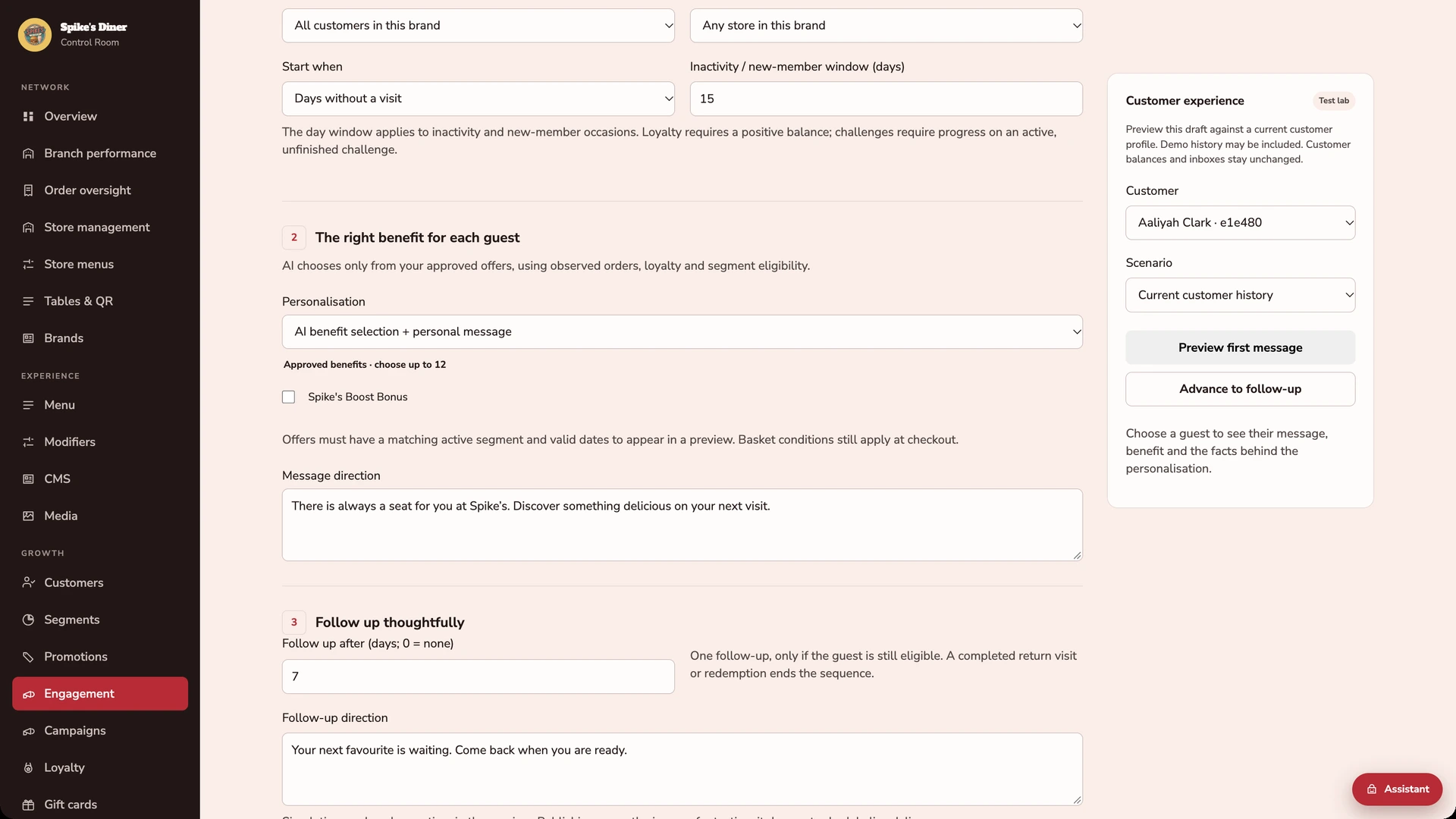
Decide what changes for each guest.
Enable AI benefit selection and personal messages. The customer preview uses one guest’s orders, favourites, loyalty and offer eligibility. These are the configuration controls; no generated result is shown here.
What your team sees Example operator record
- Recorded purchases
- 2 purchases · £21.00 paid
- Loyalty balance
- 210 points · unchanged
- Contact choices
- Email opted in · SMS off
- Latest activity
- Day 25 · 10:00
Audience, review, approved send
- Audience rules
- Bought lunch with the group; no purchase for 21+ days
- Why Alex qualifies
- Lunch on Day 1; last group visit Day 4
- Permission and exclusions
- Email opted in; no active copy of this offer
- Offer limits
- £2.50 off £12+ · Riverside · one use · expires Day 32
- Approval record
- Maya, Marketing Lead · approved Day 25, 09:45
Connected history (3 events)
- First direct order · £14.50Day 1 · Riverside · +145 points
- Second location visited · £6.50Day 4 · Station Road · +65 points
- Return-to-lunch offer approvedDay 25 · email · campaign LUNCH-25 · approver MayaNew
What does the agent do?
An agent prepares the audience and the message. Marketing reviews the proposal and the offer limits; a named person approves delivery. The campaign records the approved audience and message. Receiving the offer spends no points.
The return purchase closes the loop.
Day 27 · 12:24
Alex orders again at Riverside and redeems the invitation. The order shows the discount, the ledger records points on the amount paid, and the campaign links to the redemption.
Apple Pay, Google Pay or a card.
The kiosk demo puts Apple Pay and Google Pay alongside card or contactless payment and prepaid wallet. Choose the method that suits you.
Kiosk demo · Payment-options detail · Simulated payment
Keep a balance ready for the next visit.
The guest’s account brings prepaid balance, loyalty points and gift-card balance together. This example shows £29.01 in the wallet, 1,443 points and an Add money control.
Native iOS app · Spike’s Diner demo
What your team sees Example operator record
- Recorded purchases
- 3 purchases · £33.00 paid
- Loyalty balance
- 330 points
- Contact choices
- Email opted in · SMS off
- Latest activity
- Day 27 · 12:24
A result you can inspect
- Eligibility
- £14.50 basket meets the £12 minimum; right site; in date
- Redemption
- LUNCH-25 → guest AM-104 → order SD-1198
- Payment
- £14.50 basket − £2.50 offer = £12.00 paid
- Loyalty
- 210 + 120 earned = 330 points; offer marked used
- Measurement
- 1 linked redemption · £12.00 paid · £2.50 discount
Connected history (4 events)
- First direct order · £14.50Day 1 · Riverside · +145 points
- Second location visited · £6.50Day 4 · Station Road · +65 points
- Return-to-lunch offer approvedDay 25 · email · campaign LUNCH-25 · approver Maya
- Offer redeemed · £12.00 paidDay 27 · Riverside · SD-1198 · +120 pointsNew
What does this result prove?
A recorded return purchase and redemption after the invitation. Whether the campaign caused the visit is a separate question, answered by comparing against guests who did not receive it.
Ordering records the purchase. The guest account connects visits. Loyalty applies your rules. Marketing records the invitation and the response. Your POS connection decides which sales flow in automatically.
POS integrationsInspect the team’s workspaceActual product screens from the demo restaurant.
Behind every visit, a team in control.
Take a look inside the real back office. Explore performance, menus, guest records, audiences, loyalty and the tools your people work with.
Start with the whole operation.
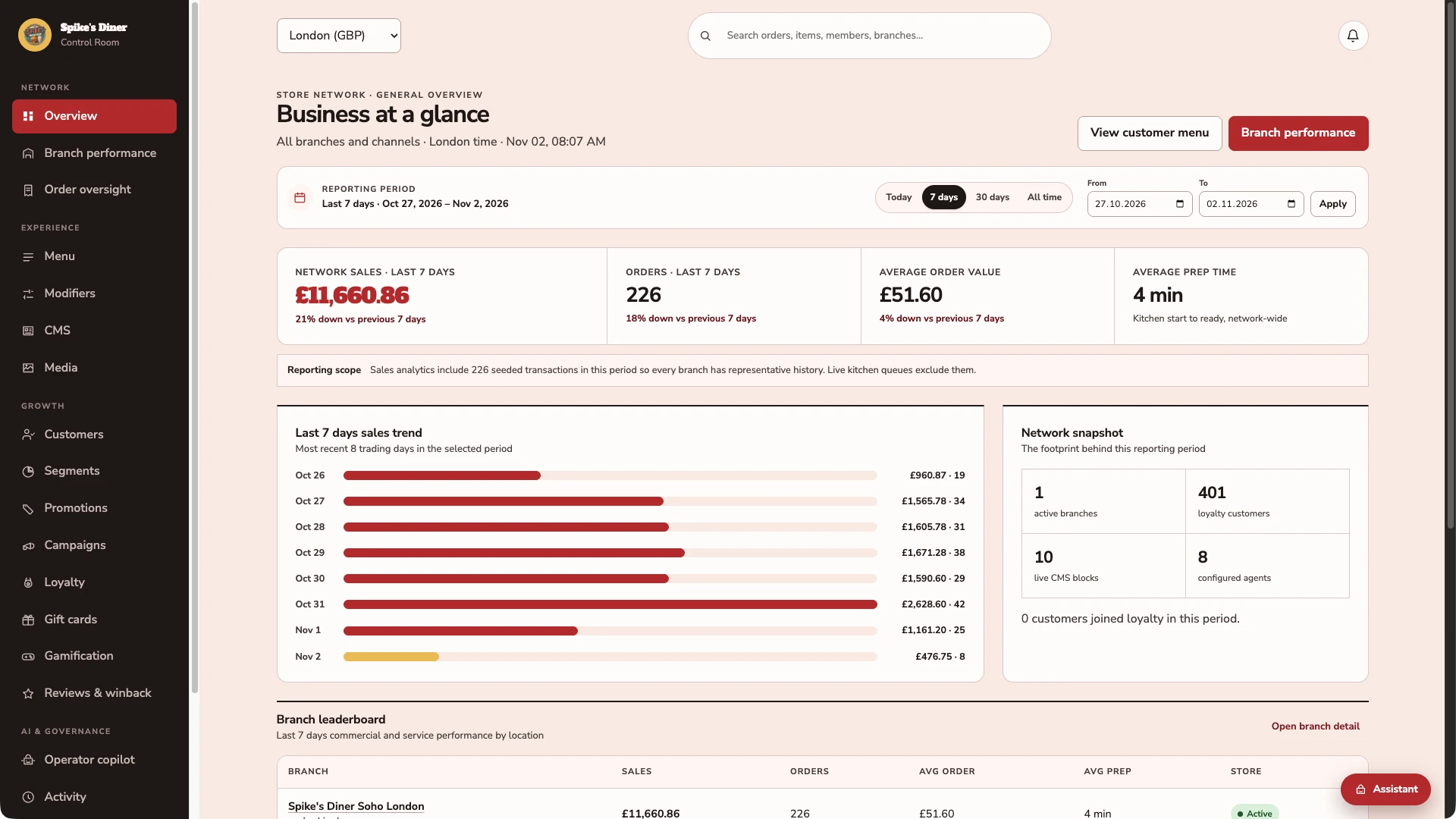
Choose a reporting period and see sales, order volume, average spend and preparation time together. This demo is showing London.
One catalogue. Clear channel availability.
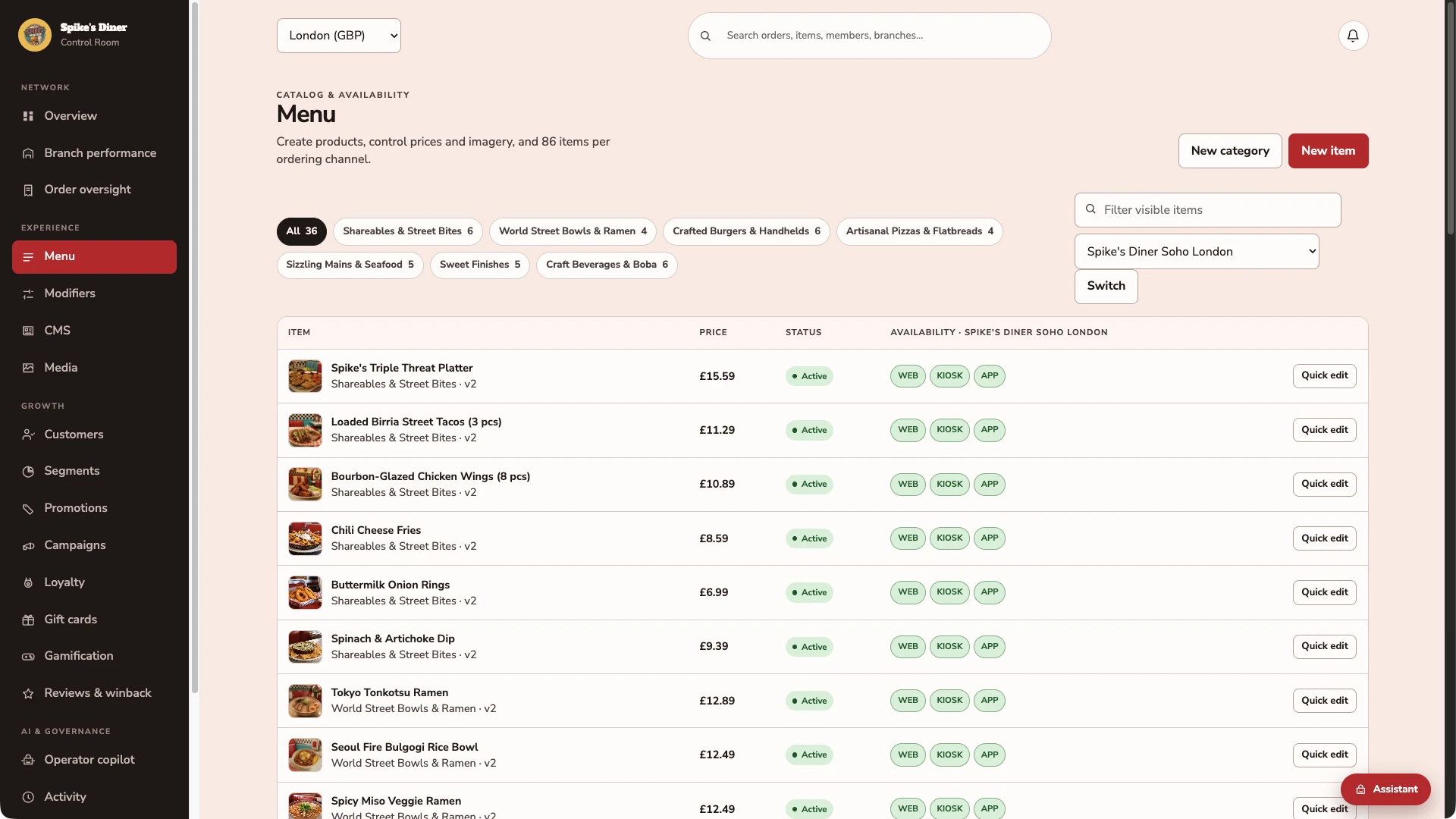
Browse products by category, check prices and see availability for web, kiosk and app at the selected site.
The same guest, seen by your team.
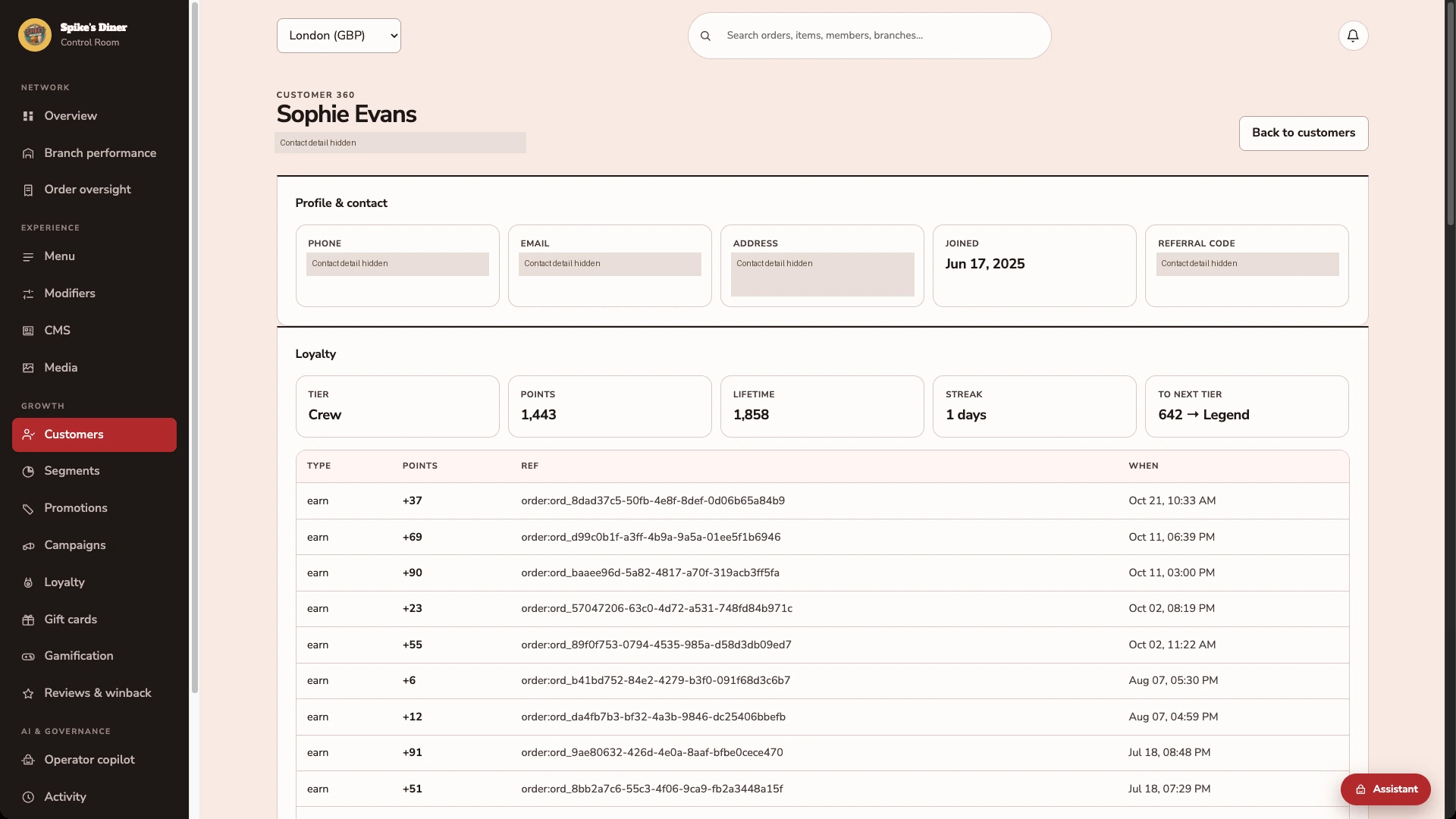
Sophie’s demo record shows the same 1,443 points and Crew tier as her guest wallet. The ledger links points entries to orders.
Start with behaviour you can act on.
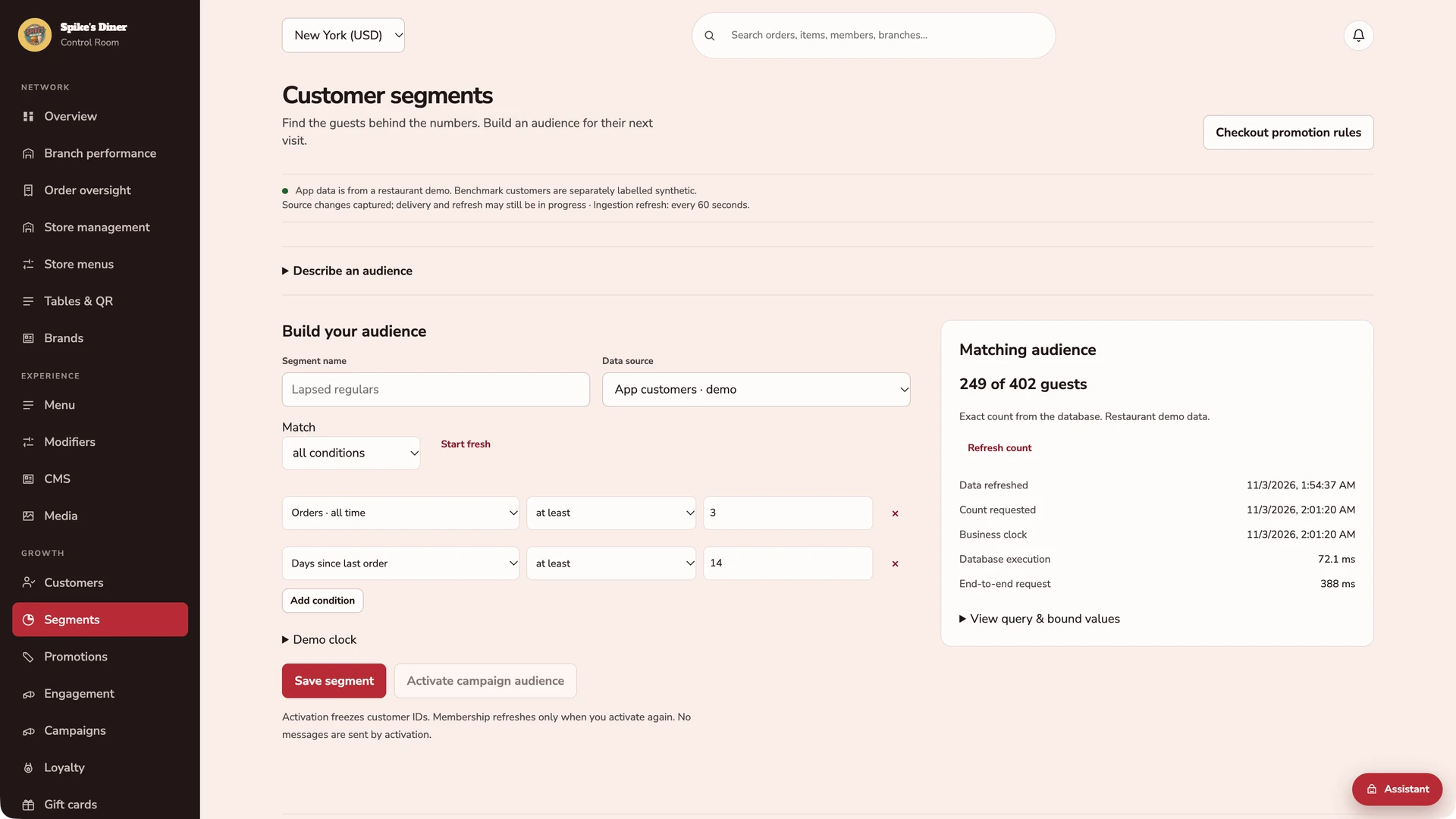
Combine purchase, visit, channel and loyalty rules. This captured example matches 249 of 402 demo guests with at least 3 orders and no order for at least 14 days. Counts are exact for the data at the displayed refresh time.
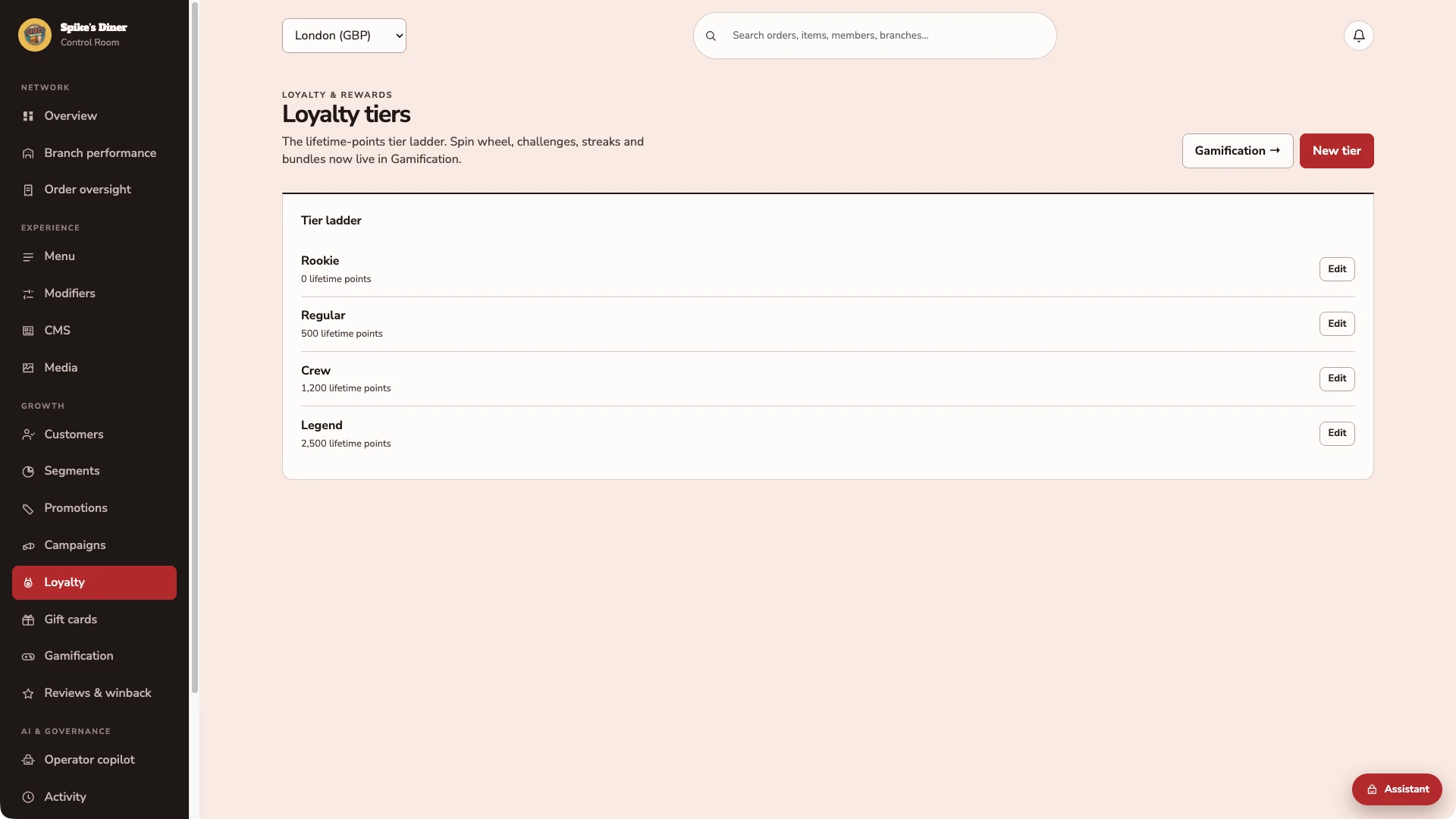
Make the programme rules visible.
The team can inspect the lifetime-points thresholds behind each membership tier. The demo’s ladder runs from Rookie to Legend.
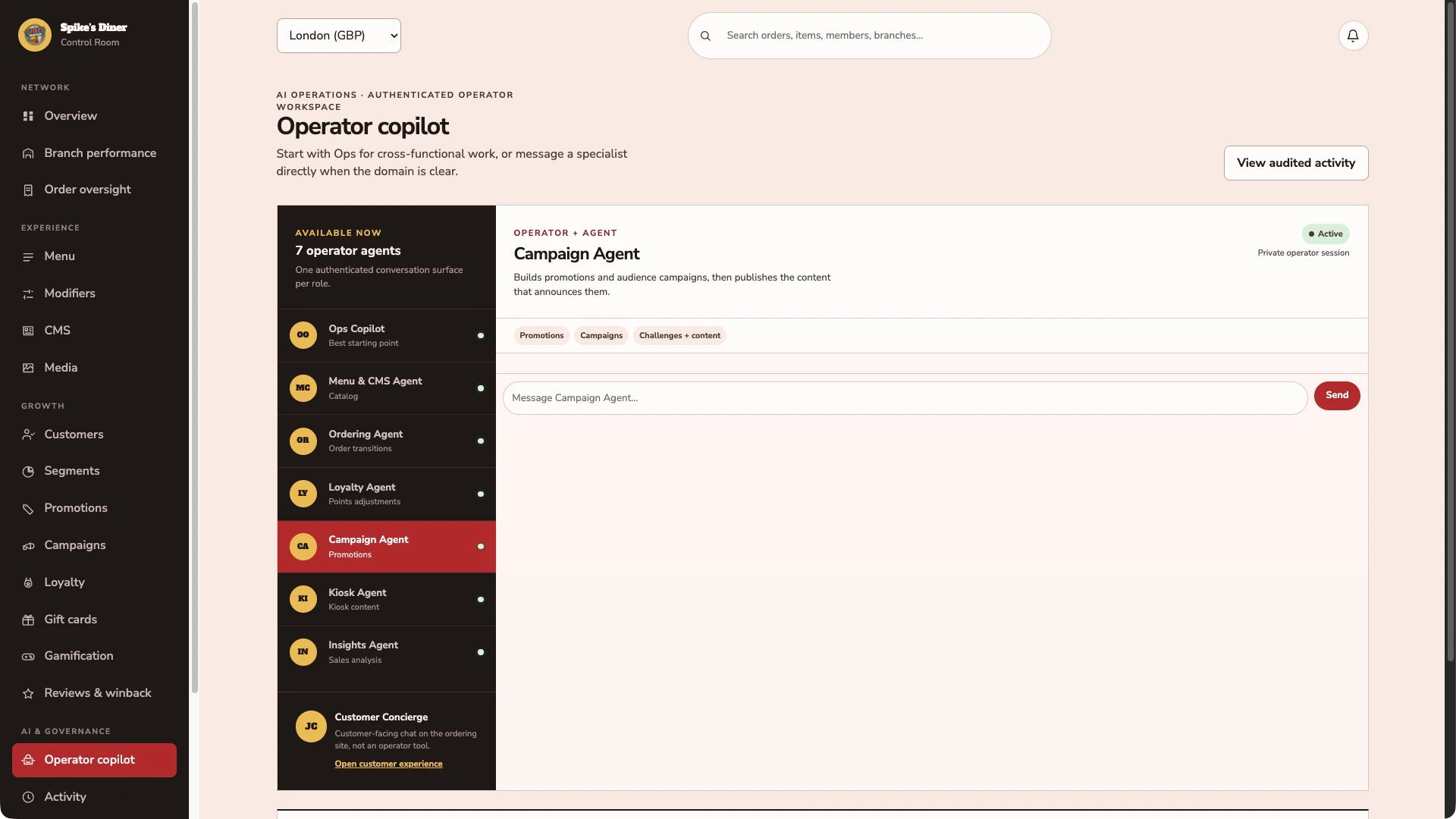
Start with the right specialist.
The operator workspace provides an Ops Copilot and specialists for menus, orders, loyalty, campaigns, kiosks and insights. An employee asks in plain words; the specialist that owns the records answers.
Real Back office screens · Seeded demo data · Contact details hidden where shown
Select a stage to watch its steps. Pause to inspect a screen.
Explore employee workflow examplesHow your team reviews and approves proposed work.
Your people set direction. Agents do the legwork.
Illustrative employee workflows. Audience building, offer previews and exports are available today; the campaign delivery and response steps describe planned capabilities, not a live sending service.
A return campaign, ready for your decision.
The employee’s request“Find lapsed lunch guests and prepare a return campaign.”
- Investigate
Show who qualifies and why
Review lunch purchases, the last group visit and contact permission. Surface missing data and exclude guests who do not meet the rules.
- Prepare
Build the audience, offer and message
Propose £2.50 off a £12 order at Riverside, one use per eligible guest. Show the audience criteria, expiry and message together.
- Approve
Marketing reviews the proposed send
A named approver checks eligibility, offer limits and wording. They can edit or reject the proposal before anything is delivered.
- Follow through
Send approved work and inspect the response
Record delivery status and link redemptions to orders. Failures stay visible; a redemption alone does not establish uplift.
An inspectable campaign: eligible audience, offer limits, message, approver, delivery status and linked redemptions.
Understand the change. Choose the next action.
The employee’s request“Why did Riverside underperform this week?”
- Investigate
Compare like-for-like records
Inspect recorded sales, orders, refunds and availability over the same period. Check connector gaps before treating missing records as lost business.
- Prepare
Explain the evidence and propose a follow-up
Show the underlying records, possible explanations and what remains uncertain. Prepare a task for the site manager.
- Approve
The area manager chooses what happens next
Review the evidence and the proposed task. Decide who follows up. No menu, offer or guest message changes just because a question was asked.
- Follow through
Assign and record the agreed follow-up
Route the approved task to the responsible person. Keep its status and outcome linked to the original question.
An evidence-backed explanation and a follow-up with a named owner, visible status and recorded outcome.
Questions about
working with us.
Read all FAQs Is Retter a software vendor or an agency?
Retter is the company that builds and runs the complete ordering, loyalty and app experience brands rely on. It designs and builds a brand's website, app, loyalty programme and back office, integrates them with the systems the brand already runs, and keeps operating them after launch. The brand gets the whole experience under its own name from one team, rather than a tool to set up alone or a one-off build handed over at launch.
Who runs it after launch?
Retter does. The team that builds a group's website, app, loyalty programme and back office keeps operating them after launch, so the engineers who built the platform are the engineers who run it. The group's own team manages the day-to-day content in the back office: menus, sites, rewards and audiences.
Where is Retter based?
Retter has offices in İstanbul, Düzce and Dubai. It builds and operates the apps, loyalty and ordering behind food and beverage brands in Türkiye and the Gulf, including Starbucks, Costa Coffee and PAUL, and now offers the same to UK food and beverage groups of 3 to 30 sites.
What happens in a demo?
A demo is a 30-minute walkthrough with the Retter team. You place an order as a guest, see the account and rewards behind it in the team's workspace, and agree what a first site would include. Before booking, anyone can open the guest demo on their own phone: it uses a fictional restaurant and payments are simulated.
Does Spike’s Diner demonstrate the complete offering?
No. Spike’s Diner is a fictional restaurant used to demonstrate selected experiences, with simulated payments. The website describes the complete offering. Product captures, conversation excerpts and illustrations are labelled separately. The waiter-app examples illustrate personalised service; a Spike’s Diner waiter app has not been confirmed.
Let’s put your restaurant in the picture.
Tell us about your sites and the systems you use. We’ll show you the guest experience, the team’s workspace and what a first rollout would include.
The guest demo uses a fictional restaurant. Payments are simulated.
In your walkthrough
- Place an order as a guest.
- See the account and rewards behind it.
- Agree the scope of your first site.