Marketing campaigns let your team build an audience from guest order history, such as regulars who have not visited for 30 days, inspect exactly who matches and how fresh the data is, save the rules and export a fixed customer list. AI can then choose one approved benefit per guest and write their message for your team to preview. Audience building and exports are available today; campaign sending and incremental-revenue measurement are not yet available.
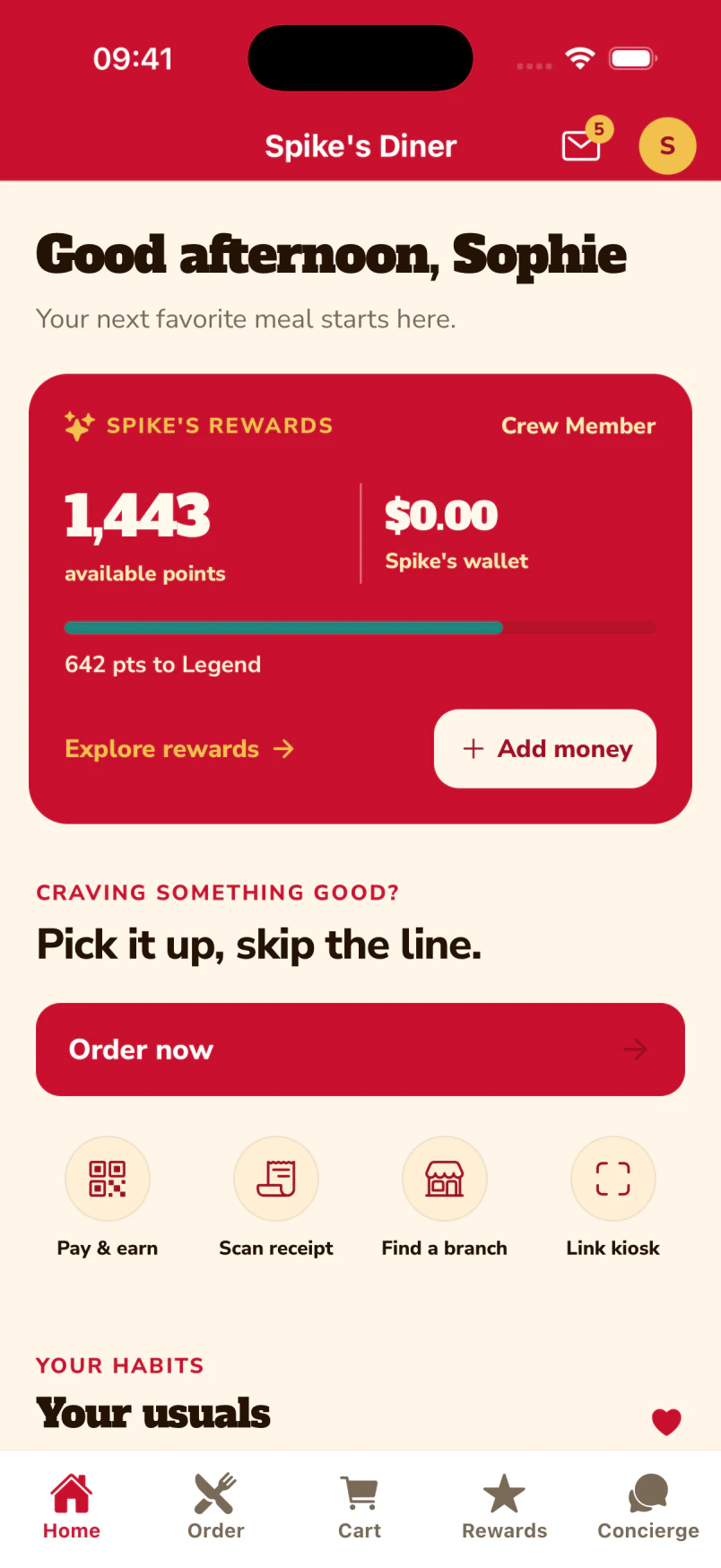
The guest’s home screen brings the inbox, rewards and ordering together.
Updates with a home in the app.
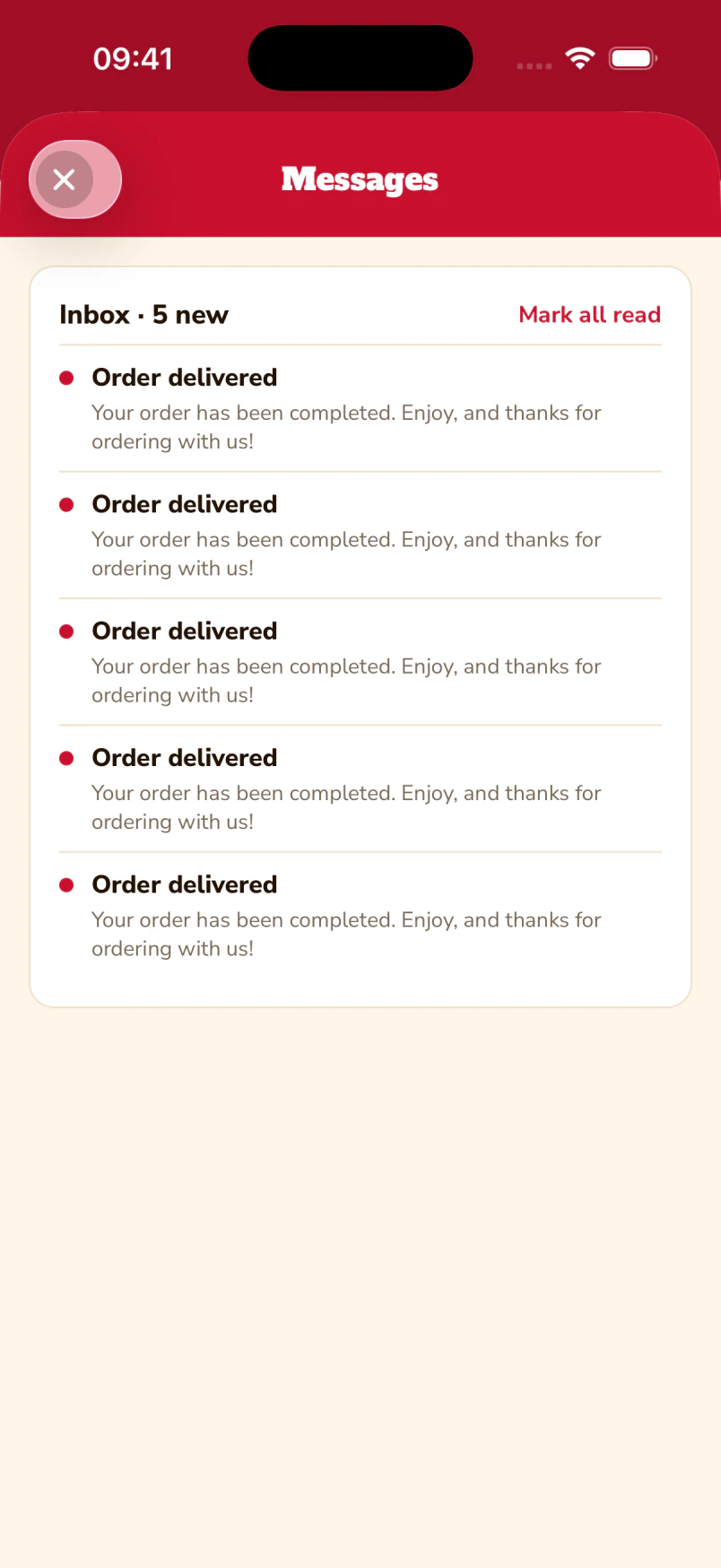
The guest inbox keeps order updates where the guest can find them again. The demo shows seeded order-delivered messages; offers arrive here once delivery is enabled.
1 / 2
Native iOS app · Spike’s Diner demo
Build the audience, then personalise it
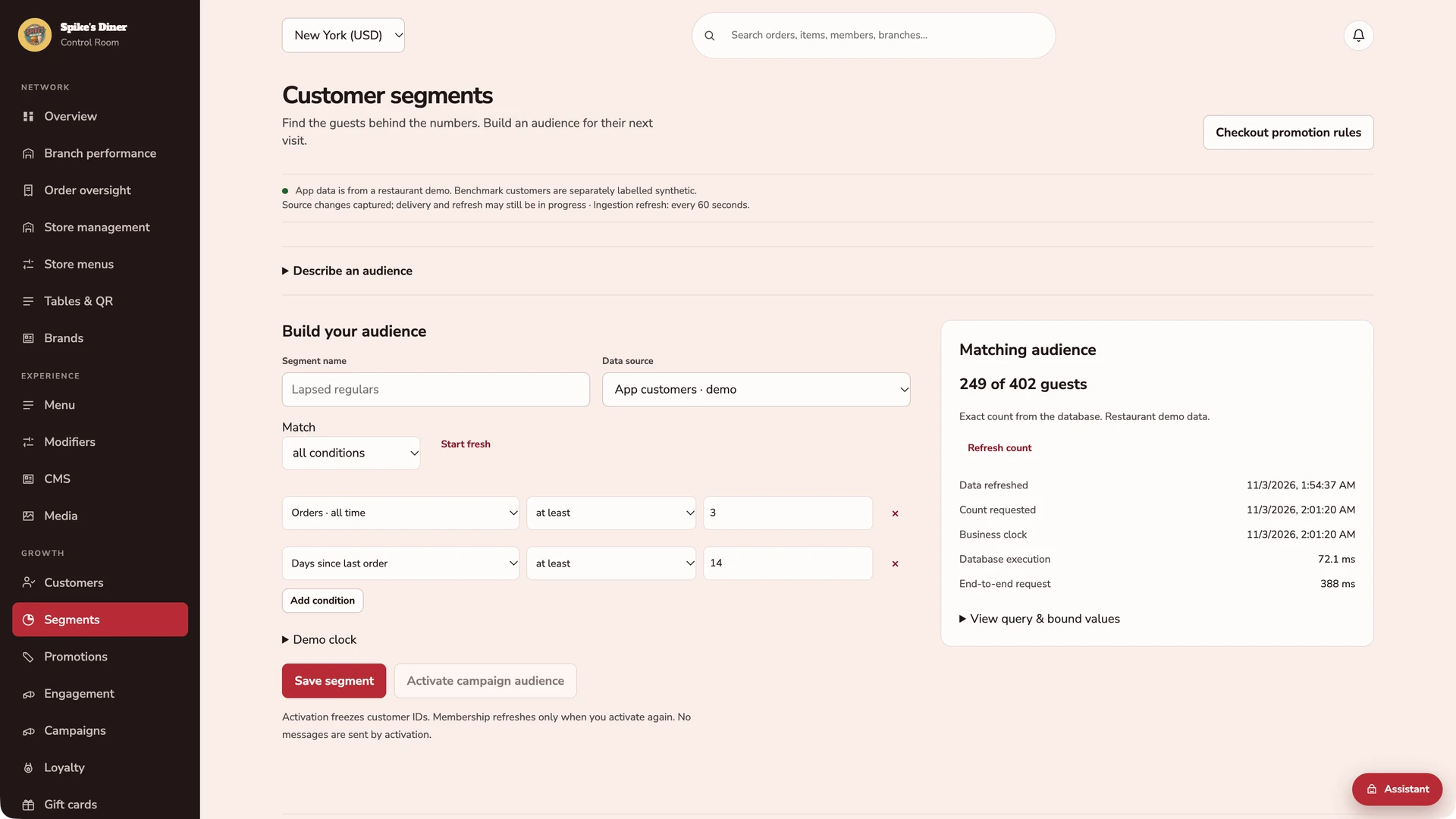
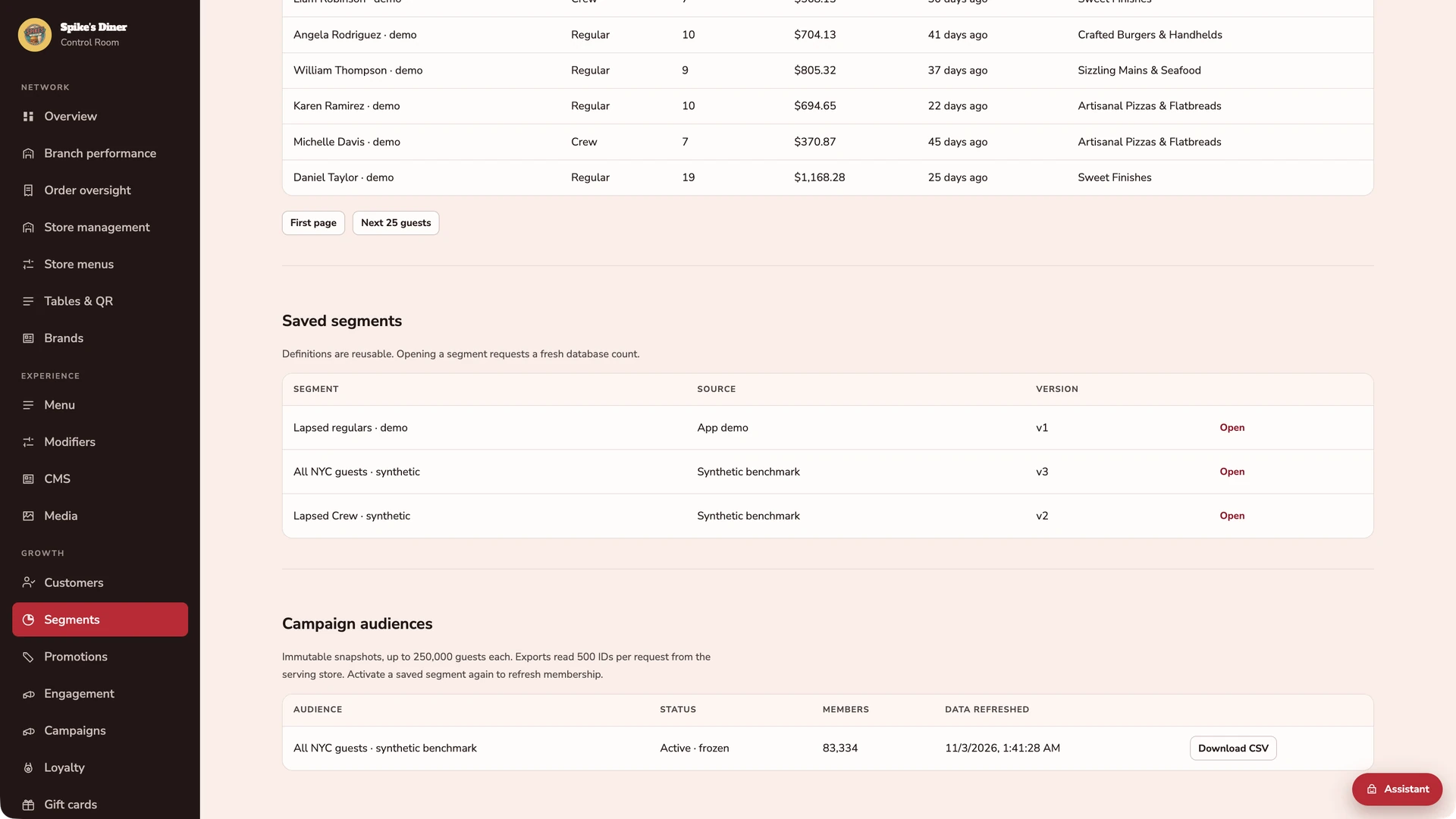
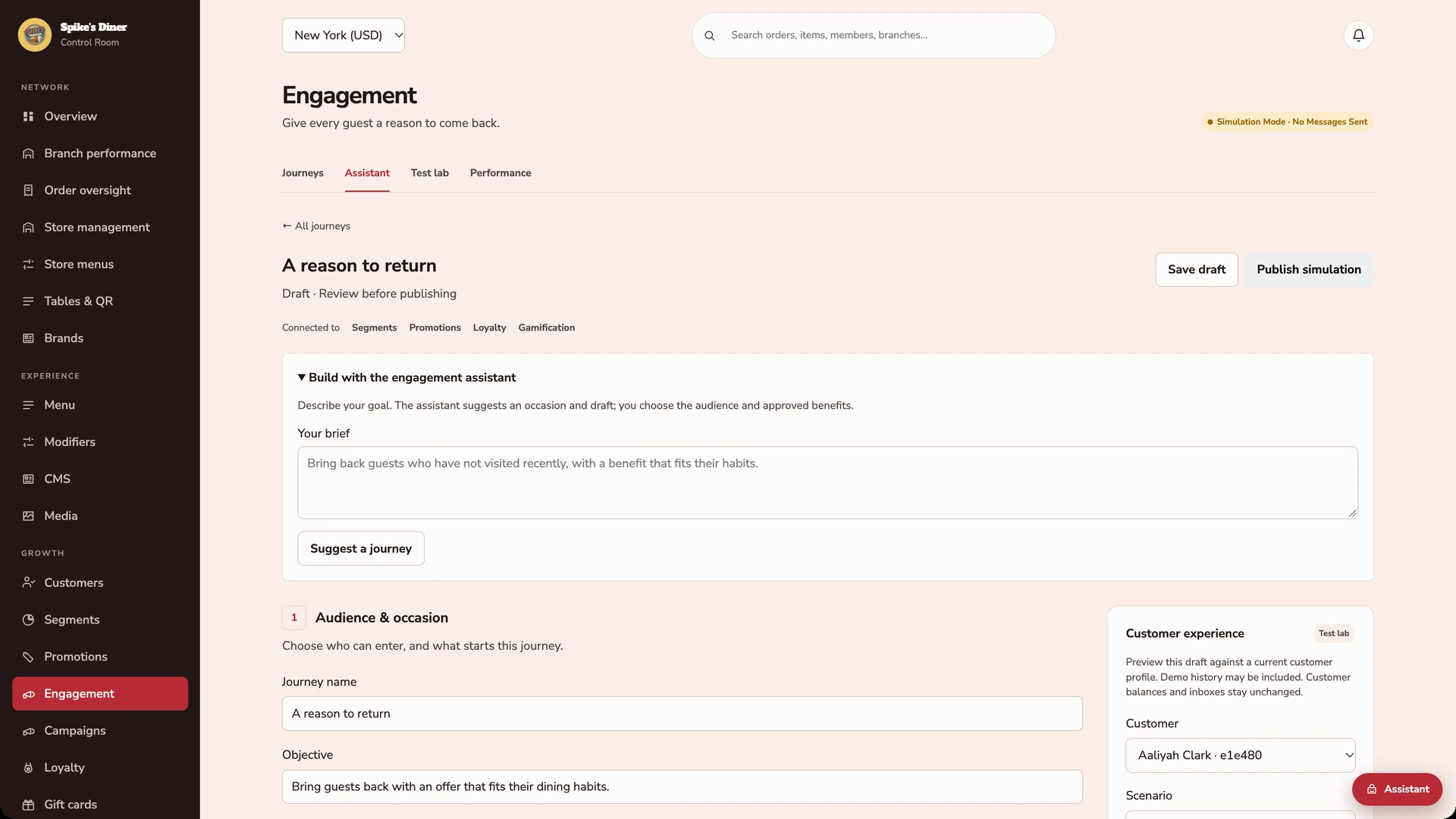
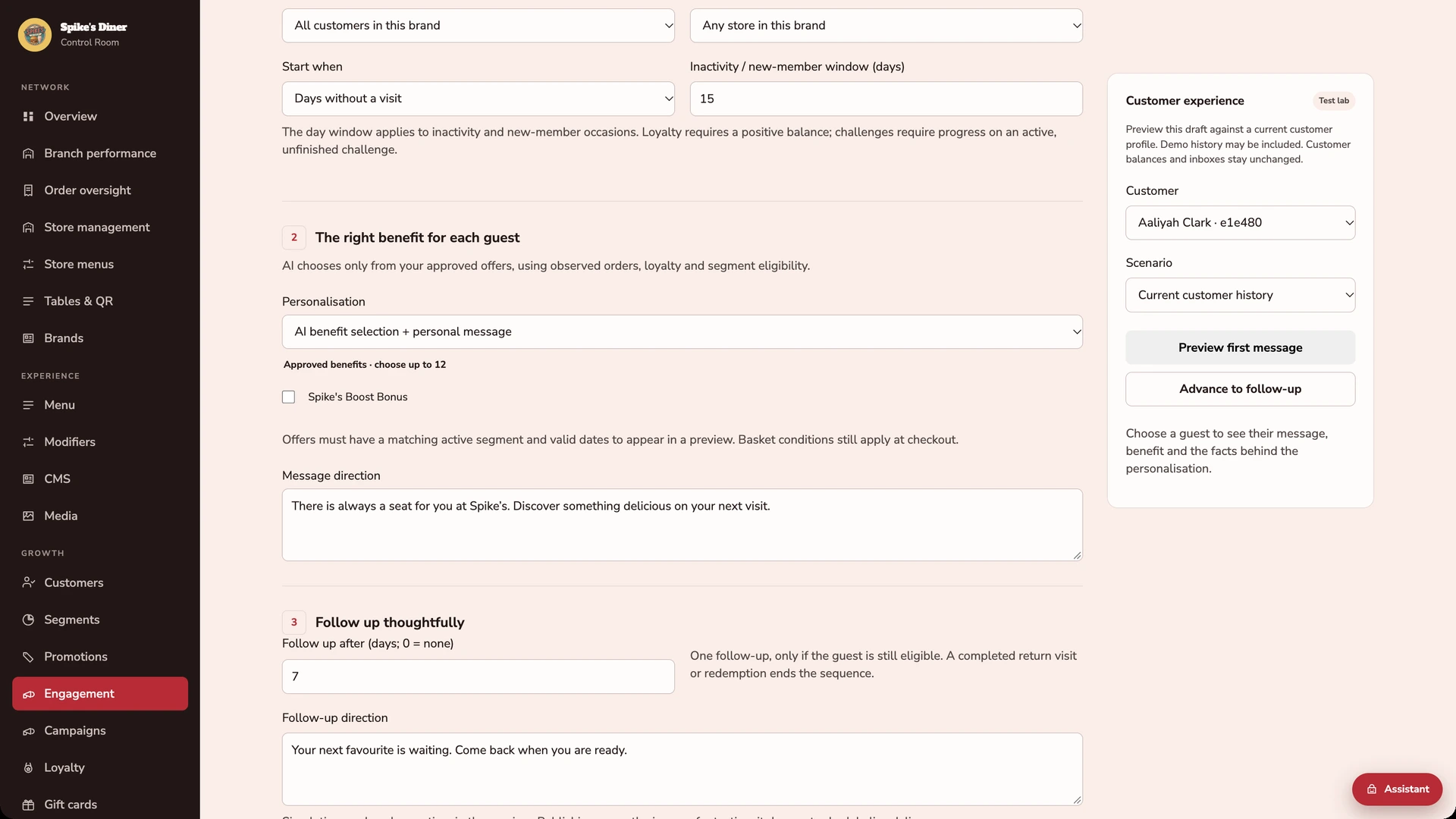
Five actual back-office screens from Spike’s Diner: the audience builder with its exact count, the matching guests, saved definitions and exports, then the journey setup and the per-guest personalisation controls. The large benchmark audience shown in the exports screen is synthetic.
Combine purchase, visit, channel and loyalty rules. This captured example matches 249 of 402 demo guests with at least 3 orders and no order for at least 14 days. Counts are exact for the data at the displayed refresh time.
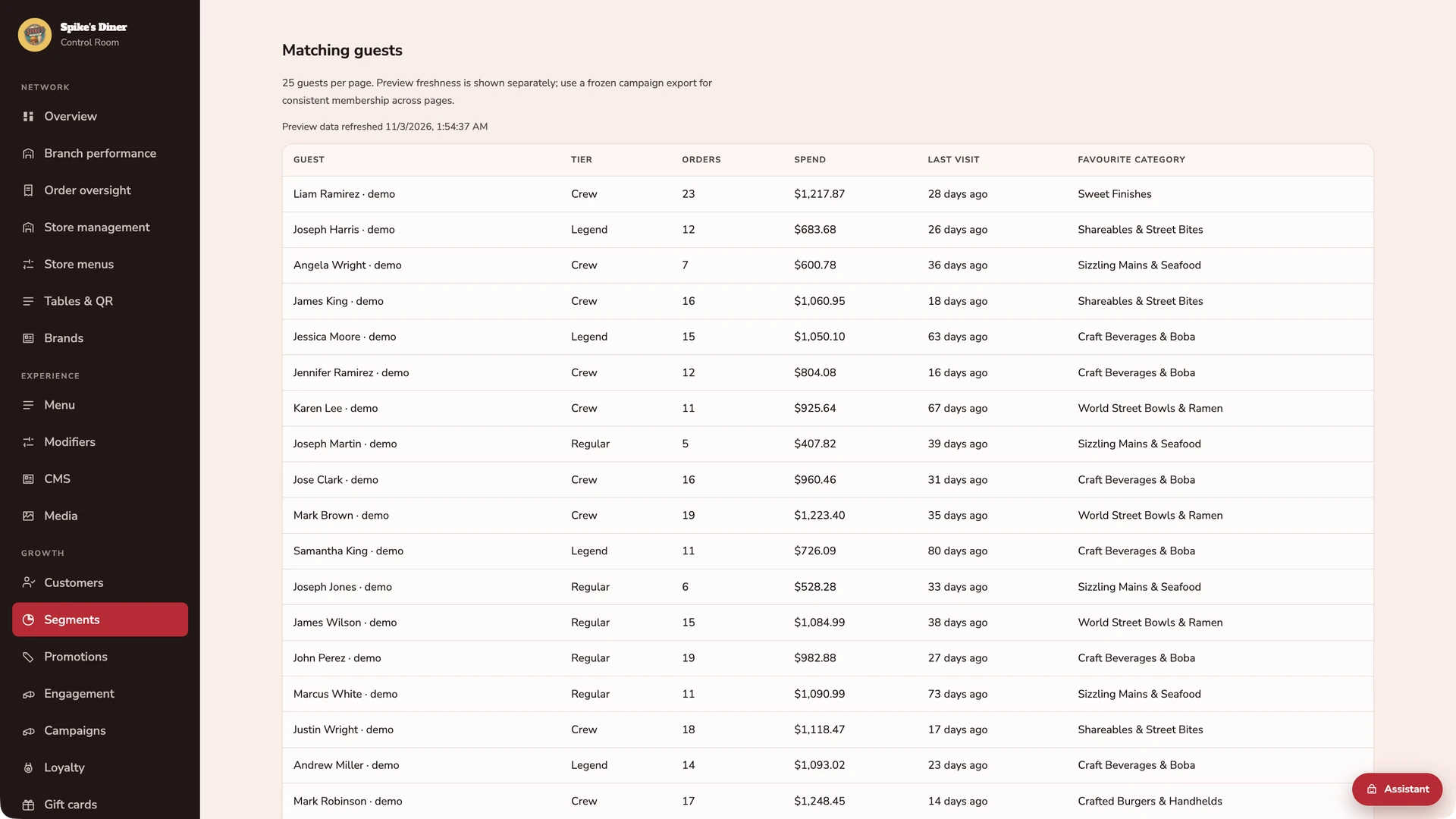
See the people behind the count.
Inspect the matching guests, their tier, orders, spend, last visit and favourite category. The preview has its own freshness timestamp; a frozen export keeps a campaign list consistent as new orders arrive.
Save the rules. Freeze the recipients.
Reopen a saved definition for a fresh audience. Activate it to freeze the customer IDs, then export the list. The 83,334-member audience shown here is from the synthetic benchmark; activation sends no messages.
Set the purpose of the journey.
Describe the occasion to get a suggested journey template, then choose the audience and approved benefits. This screen sets up the campaign; individual decisions happen in the customer preview.
Decide what changes for each guest.
Enable AI benefit selection and personal messages. The customer preview uses one guest’s orders, favourites, loyalty and offer eligibility. These are the configuration controls; no generated result is shown here.
1 / 5
Actual Back office screens · Restaurant demo data; large benchmark audiences are synthetic · Journey previews are simulations, with no messages sent Select a stage to watch its steps. Pause to inspect a screen.
Two worked examples
Illustrative example
Same audienceNo visit for 30 days
Both guests qualify. Their own history shapes what comes next.
Maya
Individual history
5 of her last 6 orders included a flat white.
Benefit chosen for this guestA flat white on usPersonal message
“Maya, your usual flat white is on us when you next drop in.”
Leo
Individual history
4 of his last 5 orders included a margherita.
Benefit chosen for this guest15% off a margheritaPersonal message
“Leo, fancy your favourite margherita again? Enjoy 15% off on your next visit.”
Your approved offers. A separate decision for each guest.
Example promotion · Bring a guest back
A reason to return15%
off their next order
A relevant offer, with boundaries you set.
Who gets it
Guests who haven’t visited in 30 days
When it runs
A 7-day campaign window
Your limits
Up to £5 off · No stacking with other offers
What your team gets with it.
Hyper-personalisation with AI
The audience determines who qualifies. AI then reads each guest’s own purchase history, favourites and loyalty, selects the one eligible approved benefit that fits them and writes their message. Preview one guest at a time; the demo runs in simulation mode.
Audiences from guest behaviour
Combine visits, spend, menu preferences, ordering channels and loyalty tiers. Inspect the exact count at the shown refresh time and the guests who match.
Rules you can reuse. Lists you can rely on.
Save a definition for a fresh audience next time. Activate it to freeze customer IDs, then export a consistent list even as new orders arrive. Activation does not send messages.
What audiences are for, what is built and the proposed win-back pilot+
Give your targeting a purpose.
Audience analytics runs independently of checkout and wallet operations. Your team can explore guest behaviour while those services handle the visit.
Win back regulars
Find guests who used to order frequently but haven’t visited recently. Give the next campaign a clear reason and audience.
Make offers more relevant
Reach burger fans, late-night diners, delivery customers or a particular loyalty tier using their transaction history.
Protect margin
Focus an incentive on the guests who fit its purpose, with conditions your team can inspect before choosing recipients.
Reuse successful targeting
Save the rules and request an updated audience next time. Freeze a separate customer list for each campaign.
What’s built. What comes next.
Available today
Audience selection, reliable data delivery, saved rules and frozen customer exports.
Next to build
Campaign sending and measurement of additional revenue caused by a campaign.
A proposed win-back pilot
The commercial payoff still needs to be demonstrated. This is the first useful test.
Choose lapsed regulars.Use order frequency and time since the last visit to define the audience.
Keep a random holdout.Randomly select a comparison group that receives no win-back message or incentive.
Measure additional visits and profit.Compare the groups over the same period, allowing for group size and deducting incentive costs.
Proposed test, not a completed campaign. The large benchmark dataset was synthetic; it is not evidence of customer demand or revenue lift.
Part of your complete setup.
Your website, customer app, waiter app and kiosk integration come together as standard. Retter builds and runs them under your brand, connected through the same menus, orders and guest records.
What is guest segmentation for restaurant marketing?+
Guest segmentation means grouping guests by what they actually did, such as regulars who have not visited for 30 days, so an offer reaches only the people it suits. In the back office Retter provides, a marketing team builds an audience from order history, sees exactly who matches and who may be contacted on which channel, saves the rule and exports the list. Sending campaigns from the back office is not yet available.
Can our marketing team send campaigns themselves?+
Not yet. Today, in the back office Retter provides, the team can build an audience from guest order history, such as regulars who have not visited for 30 days, inspect exactly who matches and how fresh the data is, save the rules and export a fixed customer list. It can also preview personal offers for individual guests using sample data. Sending email, SMS and push campaigns from the back office and incremental-revenue measurement are not yet available.
What is a restaurant CRM?+
A restaurant CRM is one record per guest that holds their orders, visits, rewards and marketing permissions across every site and channel. Retter builds it as the guest account behind a group's website, app, table ordering and loyalty programme, so the team sees one history per guest instead of separate lists in separate tools.
Can the AI agents change anything without approval?+
No. The AI agents Retter builds into the back office investigate the guest, order and site records and prepare a proposal, such as a campaign audience, a menu change or a follow-up. Changes require a named person’s approval, with the proposal and outcome visible to the team. Campaign sending is not yet available: approving an audience or offer preview does not send email, SMS or push messages.
Who owns the guest data?+
The operator does. The group is the data controller and Retter processes guest data under a data-processing agreement. Every guest record keeps its marketing permission per channel, guests can unsubscribe from any message, and the operator can export its data at any time.
Let’s put your restaurant in the picture.
Tell us about your sites and the systems you use. We’ll show you the guest experience, the team’s workspace and what a first rollout would include.
The guest demo uses a fictional restaurant. Payments are simulated.
In your walkthrough
Place an order as a guest.
See the account and rewards behind it.
Agree the scope of your first site.
The regular, recognised.Every visit adds to the same account.
We use first-party analytics to improve this site. “Analytics only” also allows Google Analytics. “Accept all” allows advertising measurement with Google, LinkedIn and Meta when configured. Privacy