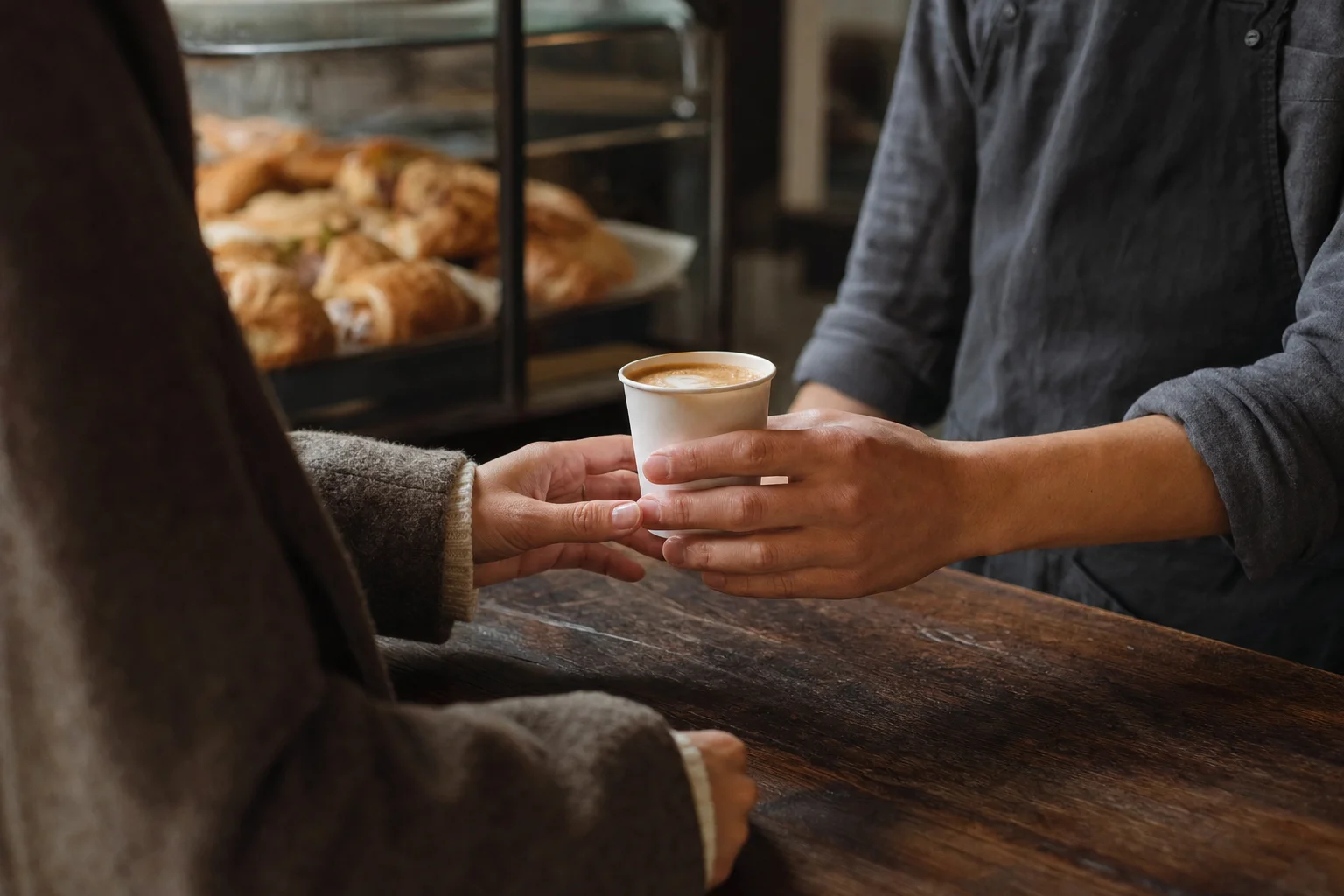
Online ordering
Online ordering lets guests order collection, pre-orders and takeaway through your own website and app, paying by card, Apple Pay or Google Pay. Orders reach the store, and identified guests’ purchases join their profile and earn points under your rules. Payment methods depend on the channel and provider; direct orders carry no marketplace commission.
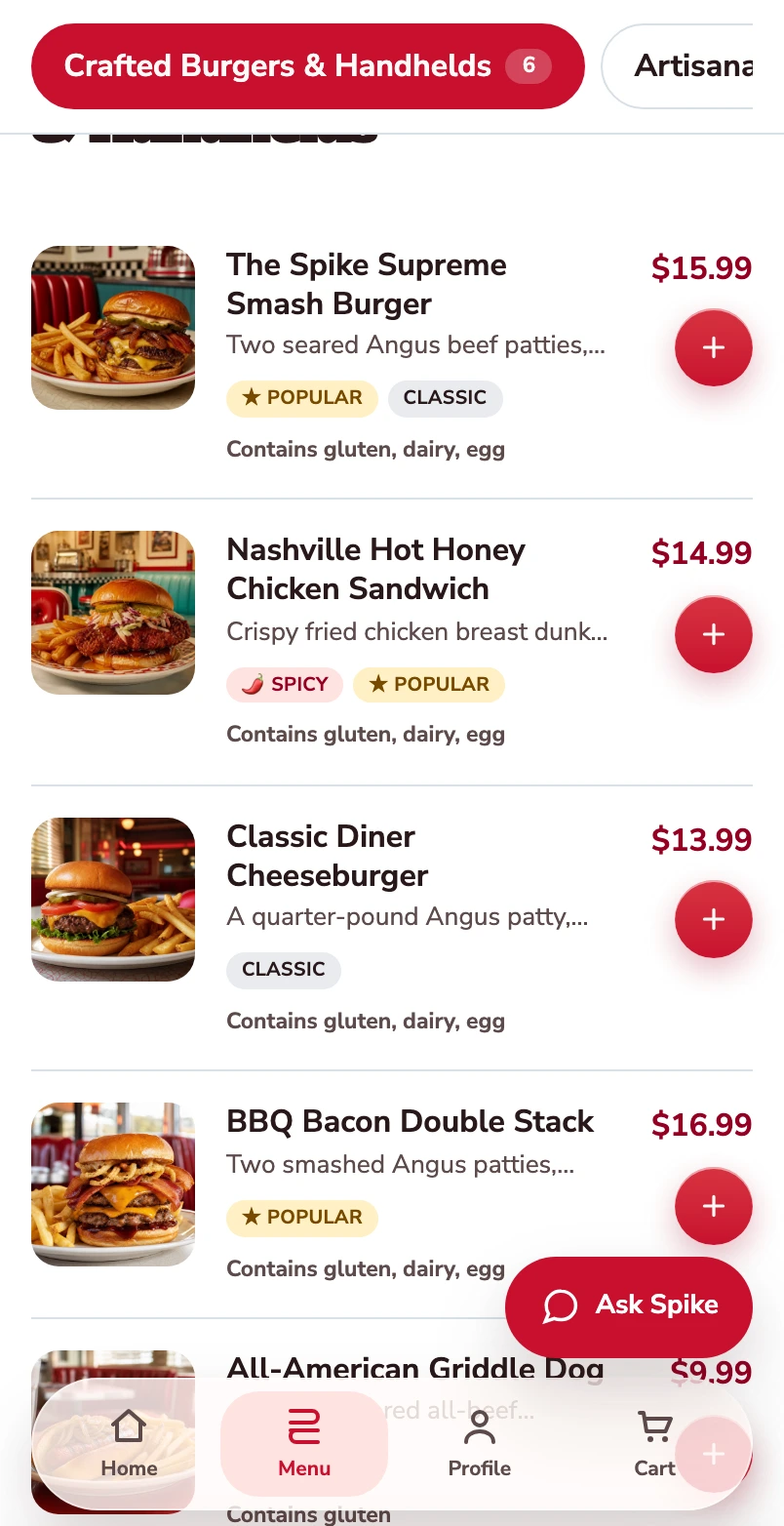
Start with the burger menu.
One burger follows through this mobile web journey, from its choices to its populated checkout.
Open the burger.
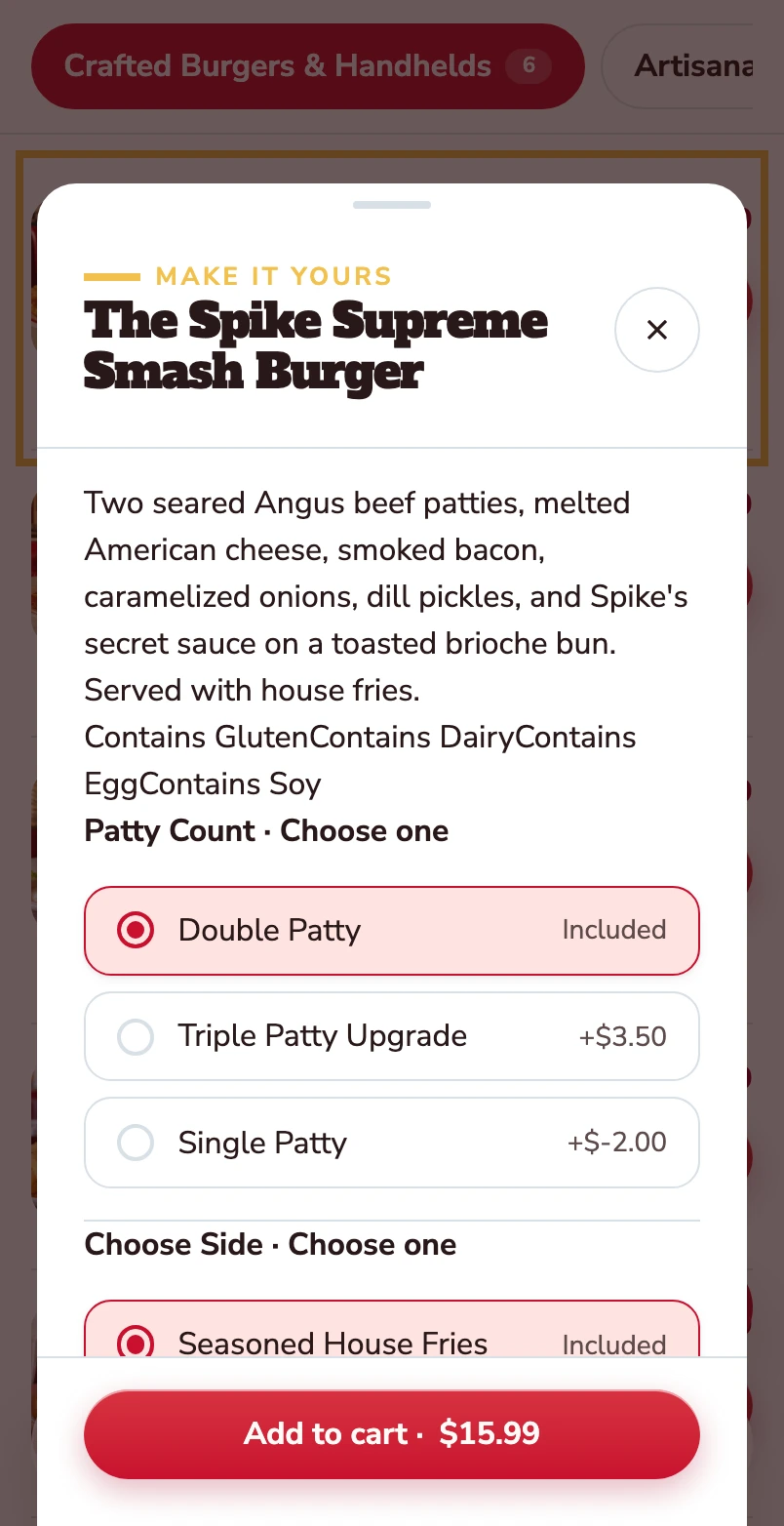
The item opens with its description, allergens and the choices attached to it.
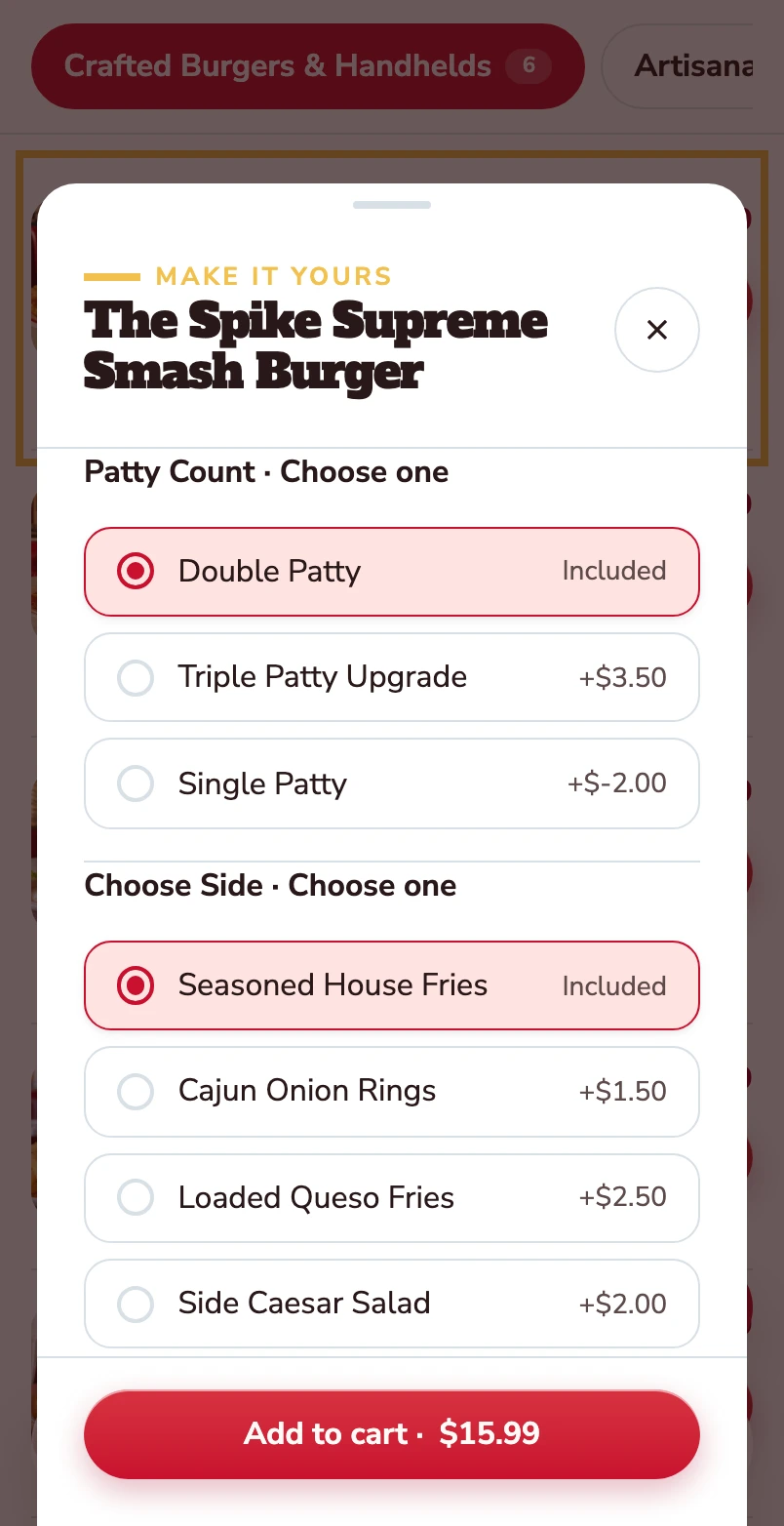
Choose the patty and the side.
Double patty and house fries are included. Other choices show their price difference before the item goes into the basket.
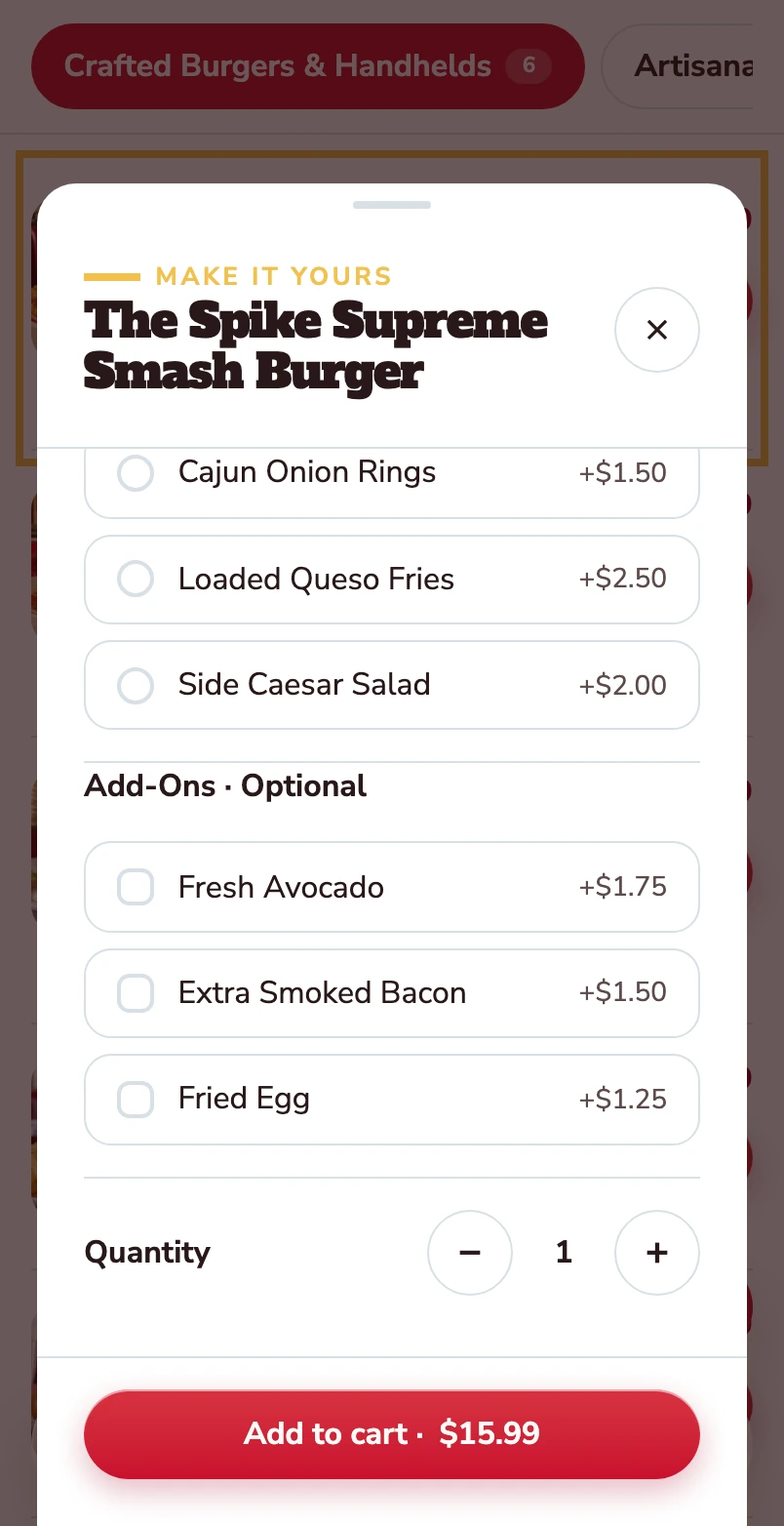
Make it yours.
Avocado, extra bacon and a fried egg are optional. Quantity and the Add to cart total stay together at the bottom.
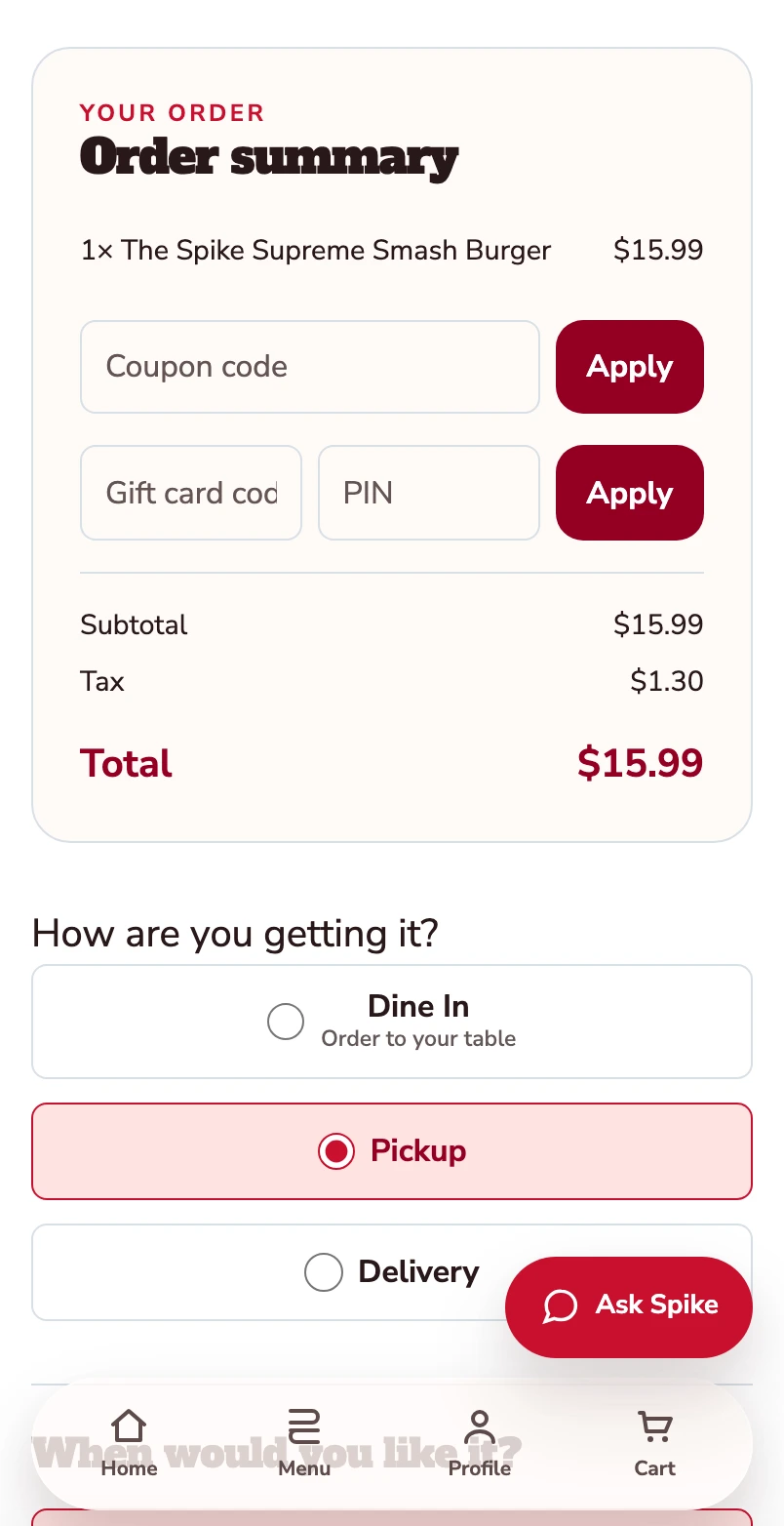
Added to your basket.
Your burger is now in the basket. The order summary shows one item and a $15.99 total before checkout. Pickup is selected.
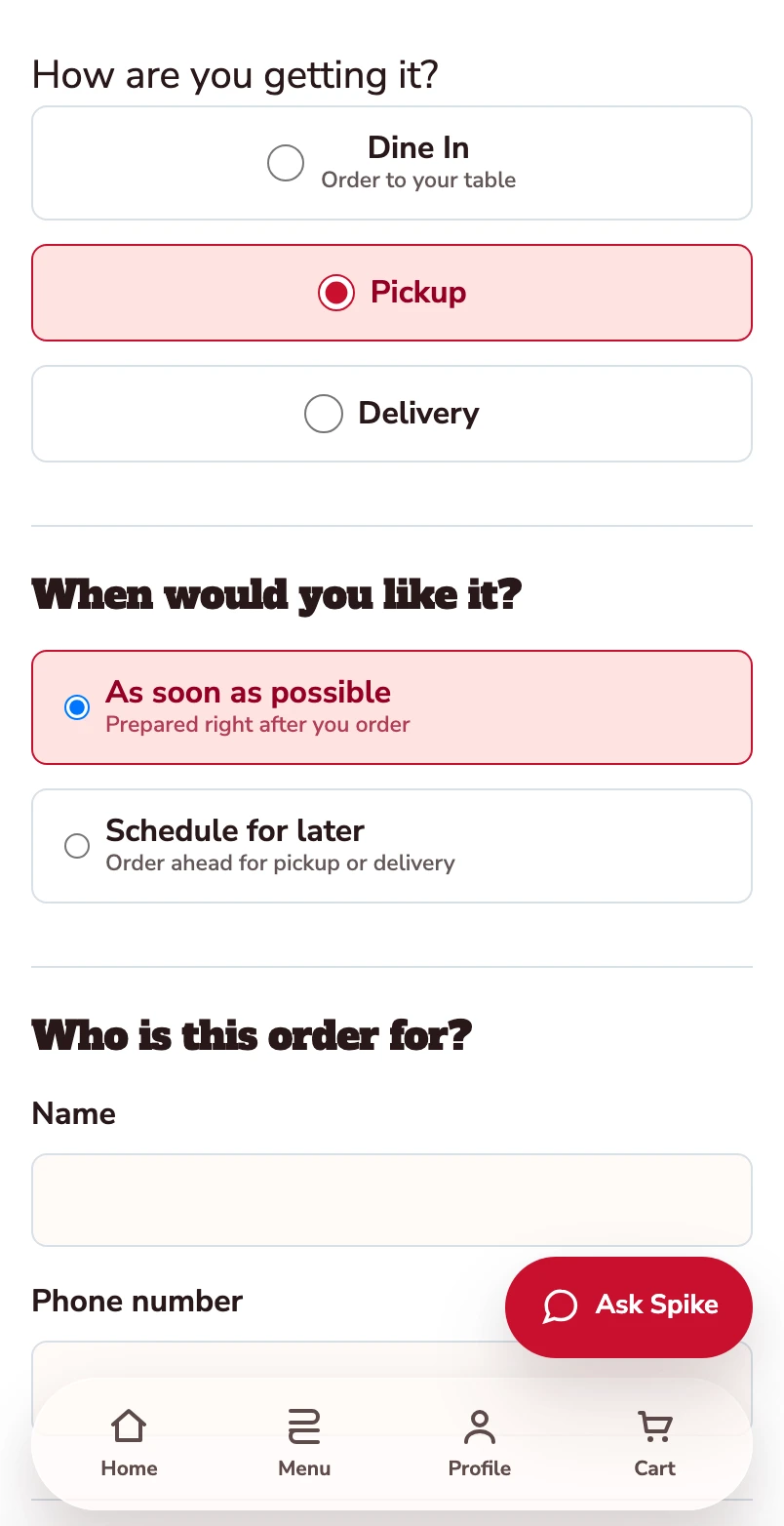
Confirm how you’re ordering.
Pickup is selected. Review the timing and contact details before payment.
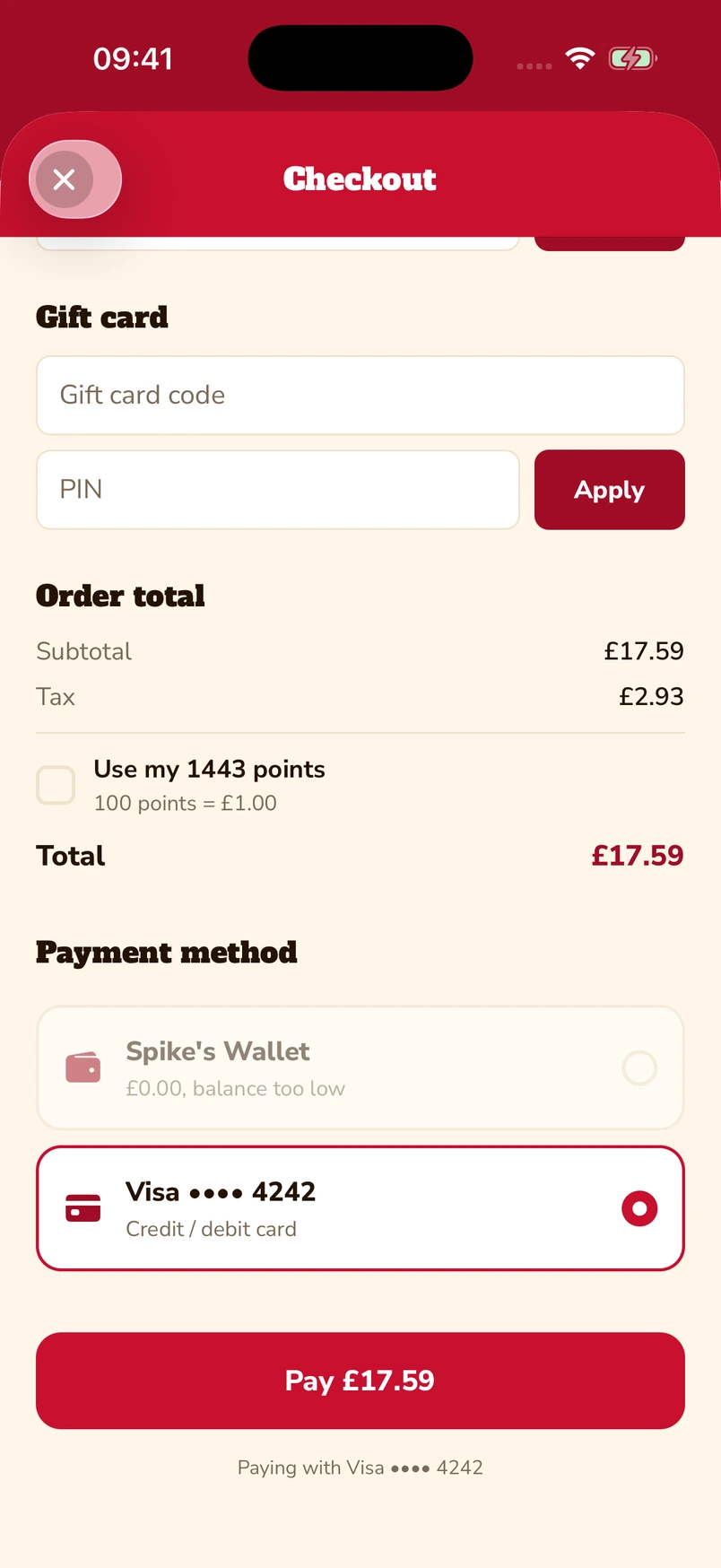
Put gift cards and points towards the bill.
Enter a gift-card code and PIN, or choose to use loyalty points at checkout. The captured app screen shows 1,443 available points alongside a saved Visa card.
Native iOS app · Spike’s Diner demo
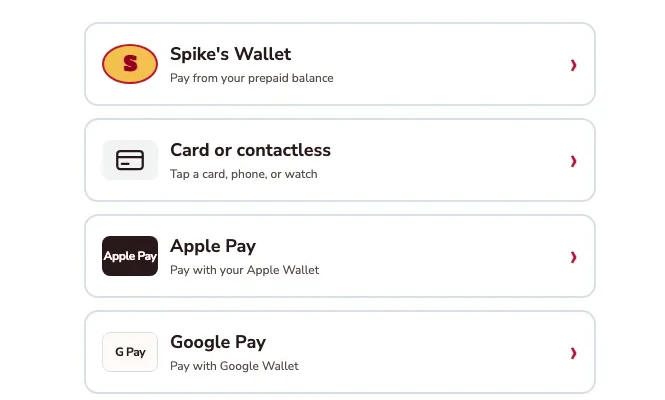
Apple Pay, Google Pay or a card.
The kiosk demo puts Apple Pay and Google Pay alongside card or contactless payment and prepaid wallet. Choose the method that suits you.
Kiosk demo · Payment-options detail · Simulated payment
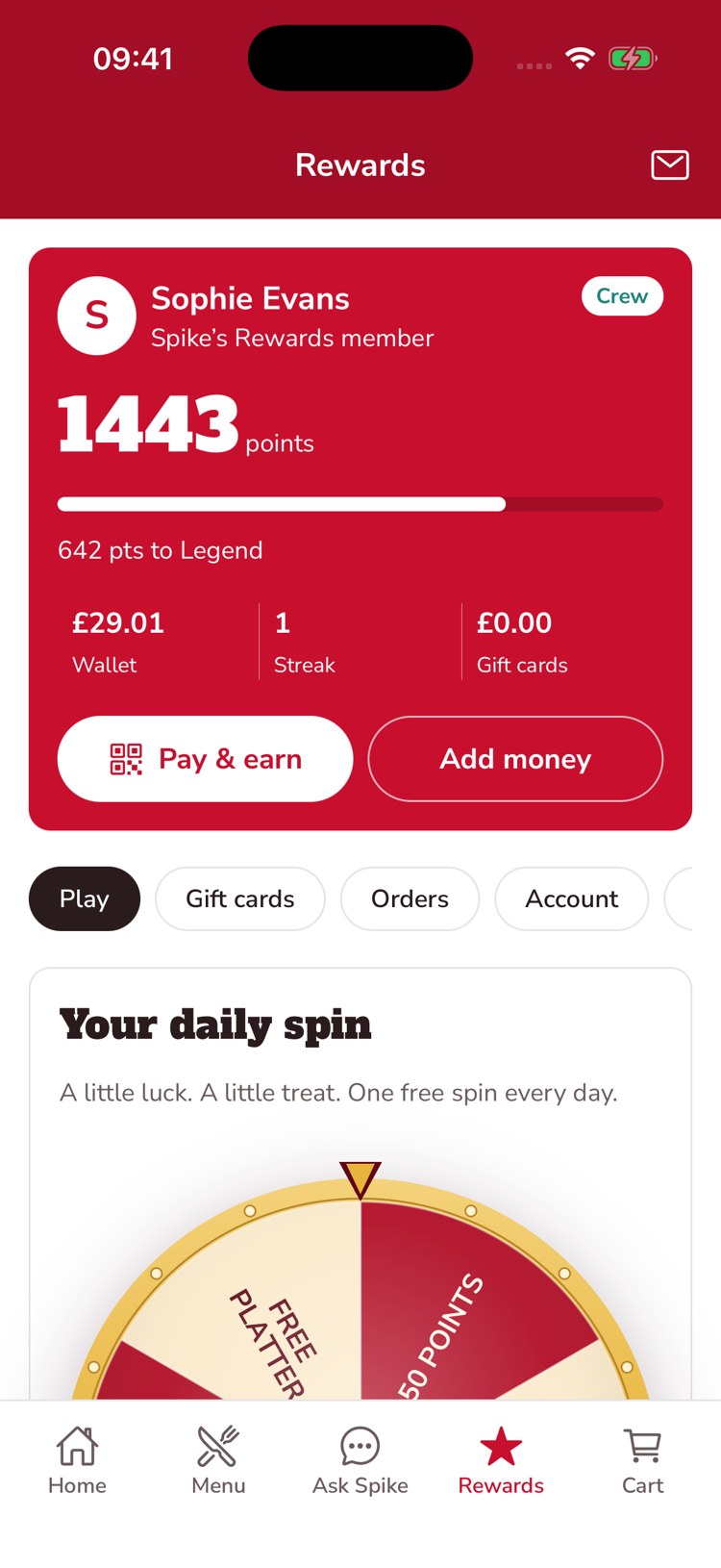
Keep a balance ready for the next visit.
The guest’s account brings prepaid balance, loyalty points and gift-card balance together. This example shows £29.01 in the wallet, 1,443 points and an Add money control.
Native iOS app · Spike’s Diner demo
Mobile web ordering · Native app & kiosk payment examples · Spike’s Diner demo
Place an order as a guest
Build a burger order through the mobile menu, choices and basket. Then explore gift cards and points, Apple Pay and Google Pay, and prepaid wallet in Pay, with separate examples from the app and kiosk demos.
Start with the burger menu.
One burger follows through this mobile web journey, from its choices to its populated checkout.
Open the burger.
The item opens with its description, allergens and the choices attached to it.
Choose the patty and the side.
Double patty and house fries are included. Other choices show their price difference before the item goes into the basket.
Make it yours.
Avocado, extra bacon and a fried egg are optional. Quantity and the Add to cart total stay together at the bottom.
Added to your basket.
Your burger is now in the basket. The order summary shows one item and a $15.99 total before checkout. Pickup is selected.
Confirm how you’re ordering.
Pickup is selected. Review the timing and contact details before payment.
Put gift cards and points towards the bill.
Enter a gift-card code and PIN, or choose to use loyalty points at checkout. The captured app screen shows 1,443 available points alongside a saved Visa card.
Native iOS app · Spike’s Diner demo
Apple Pay, Google Pay or a card.
The kiosk demo puts Apple Pay and Google Pay alongside card or contactless payment and prepaid wallet. Choose the method that suits you.
Kiosk demo · Payment-options detail · Simulated payment
Keep a balance ready for the next visit.
The guest’s account brings prepaid balance, loyalty points and gift-card balance together. This example shows £29.01 in the wallet, 1,443 points and an Add money control.
Native iOS app · Spike’s Diner demo
Mobile web ordering · Native app & kiosk payment examples · Spike’s Diner demo
Select a stage to watch its steps. Pause to inspect a screen.
A craving becomes a recommendation.
A guest asks for something warm and cinnamon-spiced. Ask Spike recommends two dishes from the restaurant’s menu, with prices and a little help choosing.
Native app · Captured 12 November 2026.
Edited replay of a captured answer; typing and response timing are recreated.
Read the conversation
Guest
What dessert would you recommend? I like warm cinnamon treats and would like to see what is available in this restaurant.
Ask Spike
We’ve got two warm, cinnamon-forward treats on our “Sweet Finishes” menu:
Churros with Dulce de Leche — £6.99 — six crispy cinnamon-sugar churros served warm with dulce de leche and dark chocolate dips. You can add extra dip or a scoop of vanilla ice cream.
Warm Skillet Apple Pie — £6.19 — cinnamon-spiced apples baked in a flaky crust, served warm, with an optional scoop of vanilla ice cream to make it à la mode.
If you love pure cinnamon-sugar crunch, go for the churros. If you want cozy baked apple comfort, the skillet pie’s the one. Both are great warmed-up treats!
What your team
gets with it.
- Direct from your brand
- Coffee to collect, bakery pre-orders or meals to take away, with no marketplace commission.
- A basket that fits the guest
- Options, notes and a clear review step before payment.
- A useful record of every order
- Identified purchases join the guest’s history and earn points automatically.
Part of your complete setup.
Your website, customer app, waiter app and kiosk integration come together as standard. Retter builds and runs them under your brand, connected through the same menus, orders and guest records.
Questions about
online ordering.
Read all FAQs What is direct online ordering?
Direct online ordering means guests order collection, pre-orders and takeaway through a restaurant's own website and app instead of a marketplace. The restaurant keeps the guest's details and order history and pays no marketplace commission. Retter builds direct ordering for food and beverage groups with card and digital-wallet payments where supported by the channel and payment provider. Orders reach the store, and identified guests’ purchases join their account and earn points under the group’s rules.
Do we get an online ordering system or loyalty programme software?
Both, on one guest record. Retter builds a group's online ordering and its loyalty programme as one system. Ordering covers collection, pre-orders, takeaway and QR table ordering through the group's own website and app. Loyalty adds points, membership tiers, rewards, punch cards and gift cards to the same guest account. Because the order and the reward belong to one record, a direct order earns points automatically and the team can see who its regulars are across every site.
How is ordering through our own website and app different from a delivery marketplace?
On a marketplace such as Deliveroo, Uber Eats or Just Eat, the order arrives without the guest attached and the marketplace charges commission on it. Retter builds the group's own ordering website, app and table QR ordering, so identified guests’ orders join their account, earn points under the group’s rules and stay in the group’s own records, with no marketplace commission. A group can keep its marketplace listings and run its own channels alongside them.
Which payment methods can guests use?
Retter builds checkout with card payments, Apple Pay and Google Pay where supported, plus gift-card redemption, prepaid wallet and loyalty points. Availability depends on the ordering channel, device and payment provider; the supported combination is agreed for your rollout. Payments in the Spike’s Diner demo are simulated.
What is included when we work with Retter?
Web ordering, mobile responsive web, a mobile customer app, a mobile waiter app and kiosk integration are included as standard. QR table ordering, loyalty and the back office connect those channels through the same menus, orders and guest records. Retter builds and runs the experience under your brand. Kiosk integration connects the hardware you already use; the launch sequence and connection scope are agreed for your group.
Let’s put your restaurant in the picture.
Tell us about your sites and the systems you use. We’ll show you the guest experience, the team’s workspace and what a first rollout would include.
The guest demo uses a fictional restaurant. Payments are simulated.
In your walkthrough
- Place an order as a guest.
- See the account and rewards behind it.
- Agree the scope of your first site.